Creating a list of generated documents
You can create a link to the generated document, for example:
on the form - using the component Document List and Document Generator In the component settings Document Generator. The component itself Document List must listen to this Document Generator and retrieve its value via valueSourceId.
on the form - using only Document List In the form's XML you should add an entry with the document generator definition, where:
document_name.pdf — any name under which the user will receive the generated document
print_template_name.xsl-* — name and version of the XSL template located in the template repository
<x1:DocumentGenerator>
<x1:Item generatorName="fop" fileName="document_name.pdf" documentTemplate="print_template_name.xsl-*">
</x1:Item>
<x1:Item generatorName="fop" fileName="another_document_name.pdf" documentTemplate="another_document_print_template.xsl-*">
</x1:Item>
</x1:DocumentGenerator>on the form - using an artifact to present the link Content (TextContent) (Feature availability depends on the license and may not be available in all deployments.) In the artifact's text content we provide a link to the document placed in the Document Generator. In the parameter resourceId = GesDocumentGenerator1-0 we provide, in addition to the component ID, Document Generator the consecutive number of the PDF document, where 0 means the first document in items, 1 — the second document in the list, etc.
Additionally:
the text content must listen to the session variable added to the artifact containing Text Content the session variable sessionToken;
example links in text content:
{hyperlink:files?resourceType=session&sessionToken=${formInstanceNumber}&resourceId=GesDocumentGenerator1-0}Information Form{hyperlink}
{hyperlink:files?resourceType=session&sessionToken=${formInstanceNumber}&resourceId=GesDocumentGenerator1-1}Loan Application{hyperlink}
in the sidebar (Feature availability depends on the license and may not be available in all deployments.) In this case you should:
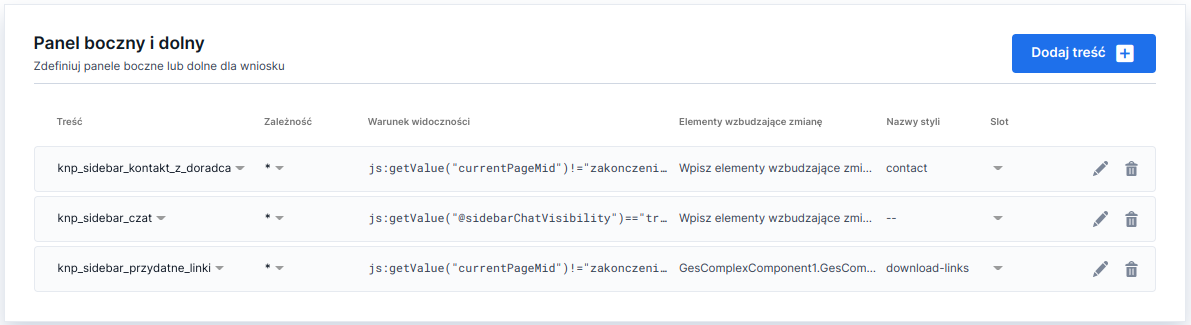
in the tab Properties of the form in the section Side and bottom panel , you should: Content (TextContent) containing the content to be presented in the side panel with a link to the document, e.g.:

Illustration 1. "Contents" (text contents) added to the so-called sidebar in the tab Properties of the form in the section Dependencies provide the names of the XSL templates generating the PDF. Because in Dependencies you can only select Contents, these dependencies are added in the form's XML source.
Note! If prints are used on the form or in a composite component, you must always add their names to Dependencies the form (tab Properties / Section General / Subsection Dependencies).
Last updated
Was this helpful?
