Checkbox

Checkbox

Component properties

Eximee Designer property
Attribute name in the Source
Description

Button selection (section Other)

checked

Specifies whether the field should be checked by default (initially set to "false"). Equivalent of the default value for other fields.

Checked button value (section Other)

valueYes

The value the checkbox takes when checked - by default, if no other value is set, the value "true" is returned.

Unchecked button value (section Other)

valueNo

The value the checkbox takes when unchecked - by default, if no other value is set, the value "false" is returned.

Checkbox positioning (section Other)

tickPosition

Feature availability depends on the license and may not be available in all deployments. Default is empty (set to DEFAULT), places the checkbox in the middle of the component in vertical orientation. Set to TOP places the checkbox at the top of the component in vertical orientation.

Content (section Basic properties)

text

Text displayed next to the component. It is possible to refer to variables or fields, e.g.: ${sessionVariable1} or ${GesTextField1}

Description (section Other)

description

Feature availability depends on the license and may not be available in all deployments. Specifies the business description of the field - the way it is displayed depends on the specific implementation of the component.

More information about component properties: Common component properties

Feeding the checkbox text with various contents

If the text next to the checkbox should depend on a condition and display different (or formatted) content, it can be fed by content from the TextContent component. To do this, attach the External data source service TextContentService, in which we provide as input parameter component an artifact containing the text to display. In the output parameters for the attribute text and value we choose the output parameter artifact.

A button directing to detailed information can be placed inside the Content (TextContent) by placing the tag <div class="ex-checkbox-more-info-label"></div>.

Content defined in moreInfoLabel can be defined dynamically (for example fed from a Text Field or another component placed on the form).

Component state information

Information about the current value of a given component property, which can then be used on the form e.g. to feed another field with the value of that property, can be obtained using the construct COMPONENT_ID$PROPERTY_NAME

For the checkbox you can retrieve the following properties:

Key
Description

moreInfoButtonClicked

true - if the link to detailed information was clicked at least once

Example: feeding the property Data source from another field (valueSourceId) via GesCheckbox1$moreInfoButtonClicked returns the true/false value telling us whether the checkbox was checked.

Available events

Name
Description

CHECK

Event emitted when the checkbox is checked

UNCHECK

Event emitted when the checkbox is unchecked

Available actions

Action documentation: Actions

Name
Description

CHECK

Checking the checkbox. NOTE: does not emit the CHECK event

UNCHECK

Unchecking the checkbox. NOTE: does not emit the UNCHECK event

TOGGLE

Change the checkbox value to the opposite. NOTE: does not emit CHECK and UNCHECK events

Illustration 1. Example of checkbox position set to TOP and default (DEFAULT)

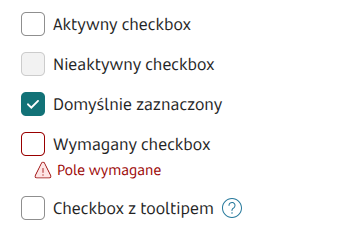
Illustration 2. Sample appearance of the component on the form

Illustration 3. Sample appearance of the component on the form in switch presentation

Demo forms: demoCheckbox, demoPopup

Last updated

Was this helpful?