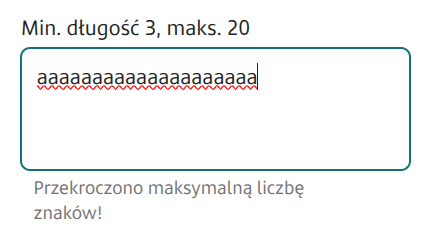
If set to "true", a counter showing how many characters have been entered will be displayed under the component. If the field also has a value set in the Maximum number of characters, a note about the possible maximum number of characters that can be entered will also appear under the component. Displaying validation errors hides the counter. Availability of the feature depends on the license and may not be available in all deployments.
Maximum number of characters
maxLength
Maximum number of characters that can be entered in the field
Message for exceeding the maximum number of characters (section Data quality)
maxLengthWarning
Message displayed after exceeding The maximum number of characters
Maximum number of lines (section Data quality)
maxLines
Maximum number of lines
Minimum number of characters (section Data quality)
minLength
Minimum number of characters
Formatting
formatter
The name of the formatter used for the field. Availability of the feature depends on the license and may not be available in all deployments.
Real-time formatting
formatterRealTime
Specifies whether formatting should occur after pressing a key on the keyboard or only after leaving the field. Availability of the feature depends on the license and may not be available in all deployments.