Connecting a service at the page or entire application level

Example of attaching a service

Besides the standard attaching of services to individual components, Eximee allows defining services at the page or application level. They are used to supply data to many fields at once or to perform operations when entering/exiting the application. For example, you can define a service PageService for a page with a customer's address that, after entering the postal code, automatically fetches and fills the city and voivodeship in other fields. Another case is EntryService triggered when opening the application – e.g. fetching basic customer data and filling the form with it.

Step-by-step configuration:

  1. Adding a service at the form level: First, you need to register the appropriate service in the context of the application:

    • Page service (PageService): To add a page service, open the Page services tab located on the left side of the editor view.

    • Input/output application service (Entry/Exit Service): Alternative text for the default value "Choose": Properties for the entire application you should add the service as Entry service (executed when opening the application) or Exit service (executed when finishing or submitting the application).

      Illustration 1. Service selection window defined for the page (filtered list to PageService available on the application)
  2. Attaching a service to a component: Next, select the component that should display data coming from the chosen service (e.g. the Customer City field). In its properties, in the Interactionssection, you need to again use the External data source field – click Select service and search the list for the previously created service. Then choose the correct Page or Entry type service from the list.

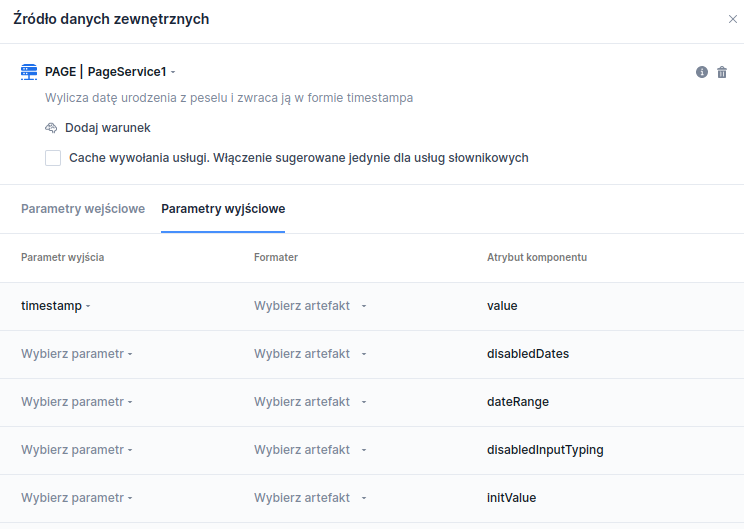
    Illustration 2. Window for selecting the output parameter for the service
  3. Mapping results: After selecting the service, go to the Output parameterstab. From the available data returned by the service, select the appropriate output field and map it to the component attribute. For example, the GetCustomerDataService can be mapped so that the value attribute of the City field receives the value from the clientCity parameter returned by the service.

  4. Input parameters (if required): If a page/application-level service requires input parameters (e.g. postal code as input to PageService), these parameters should be bound in the EDS input configuration. By default, listening will be set on the components specified in the input parameters.

  5. Refreshing data on change: Thanks to the listening mechanism, if the value in the service's input field (e.g. postal code) changes, the associated Page/Entry service will be automatically invoked again and dependent components refreshed. The user does not need to take additional actions – the form will ensure the data is up to date.

Last updated

Was this helpful?