> For the complete documentation index, see [llms.txt](https://docs.eximee.com/llms.txt). Markdown versions of documentation pages are available by appending `.md` to page URLs; this page is available as [Markdown](https://docs.eximee.com/documentation/documentation-en/budowanie-aplikacji/interfejs-uzytkownika/formularze/praca-z-komponentami-bazowymi/walidacja-wartosci-komponentow/walidacje-zlozone-wlasne.md).

# Complex validations (custom)

Complex validations requiring algorithm implementation are implemented by developers and added to the validator library located in **Eximee Validation**. In cases where validation is to be performed via external services (e.g. an ESB bus), it is necessary to use **Service Proxy** to make the given service available.

If validations do not require connection to external services, lightweight script validators can be used (more in: [Script validators (validationScript)](/documentation/documentation-en/budowanie-aplikacji/logika-biznesowa/scriptcode/walidatory-skryptowe-validationscript.md)). Complex validators can be used for application fields, pages, or complex components (used later on the application).

### Complex validations for components <a href="#walidacjezlozone-walidacjezlozonedlakomponentow" id="walidacjezlozone-walidacjezlozonedlakomponentow"></a>

In addition to requiredness and masking, specialized external validators can also be added to components.

#### **Attaching a validator**

To attach a validator, enter artifact edit mode and select any component that can have a validator attached. Then click the section **Data quality** in the component properties menu. After expanding the section, we will see the subsection **VALIDATORS**.

<figure><img src="/files/98468a8f03b08621acc283a217c2c06aeeb4b7b6" alt=""><figcaption><p><em>Figure 1. "Data quality" section with the VALIDATORS subsection</em></p></figcaption></figure>

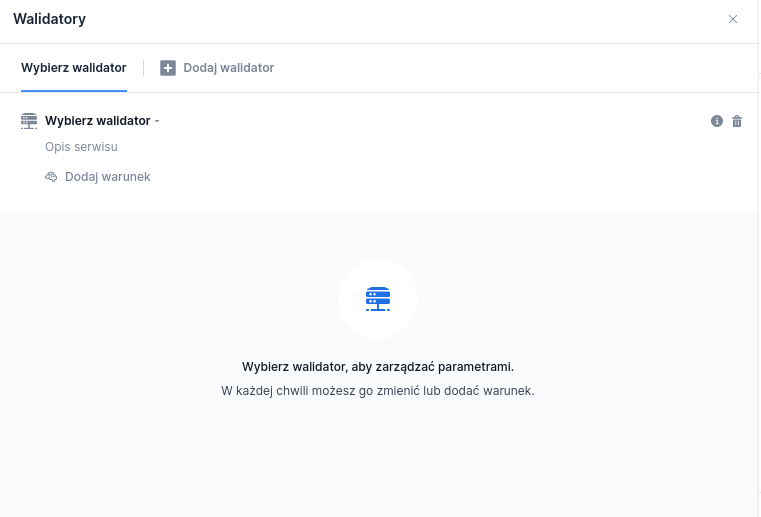
After clicking on **VALIDATORS** or the pencil icon, the validators window will appear.

<figure><img src="/files/9b80db2d6fcccba4b81c0360eab958f1b10cb956" alt=""><figcaption><p align="center"><em><strong>Figure 2.</strong> Validators window</em></p></figcaption></figure>

After selecting the option **Select a validator** we will be able to search for and select a given validator. The list includes standard validators and script validators. For a validator, you can define a triggering condition (field **Add condition**). This is a JavaScript condition in which you can use fields or session variables available on the application. The method of creating conditions is described in [Expression language for defining conditions (conditions with getValue)](/documentation/documentation-en/budowanie-aplikacji/logika-biznesowa/jezyk-wyrazen-definiowania-warunkow-warunki-z-getvalue.md).

<figure><img src="/files/74a8414bd9e575a8eeb900ca65532cac497f48eb" alt=""><figcaption><p align="center"><em><strong>Figure 3.</strong> Adding a validator</em></p></figcaption></figure>

#### **Simulation**

Validators, just like external services, support replacing their operation with a simulation script. Attaching such a script requires selecting the tab **Simulation** and selecting the available simulation script from the list.

<figure><img src="/files/93f4b5a0c96eaadedc538ca17b0bc0d62dac65d9" alt=""><figcaption><p align="center"><em><strong>Figure 4.</strong> Simulation script attachment tab</em></p></figcaption></figure>

From here, we can also choose to create a new script by clicking the button **Generate a new script**. The newly created script will automatically have content generated in line with the validator and the described separated code sections.

<figure><img src="/files/902ddb6b77f50021aba9328bda523d222a2d79ad" alt=""><figcaption><p align="center"><em><strong>Figure 5.</strong> Creating a simulation script</em></p></figcaption></figure>

Please remember that such scripts will be run **only** when entering the application with **enabled** application logic simulation mode!

### Complex validations on the page <a href="#walidacjezlozone-walidacjezlozonenastronie" id="walidacjezlozone-walidacjezlozonenastronie"></a>

#### **Adding validators on the page**

Validators can also be added on the page:

* If the page listens to the fields that we pass to the validator, the validator is called when the field that the page listens to changes.
* If the page will not listen to the fields, the validator will be called only after clicking the button **Next/Send.**\ <br>

<figure><img src="/files/b22972e7560b4310f633f41a5abf7858115aad2d" alt=""><figcaption><p align="center"><em><strong>Figure 6.</strong> Properties panel with two validators added for the Page1 page</em></p></figcaption></figure>

#### **Adding** **validators on a complex component**

It is possible to add validators on a complex component. They will work as if they were added on the page where the complex component is located.

### Adding translations for validation messages <a href="#walidacjezlozone-dodanietlumaczenkomunikatowwalidacji" id="walidacjezlozone-dodanietlumaczenkomunikatowwalidacji"></a>

Each validator returns a validation message. The message content may already be translated into Polish or may be in another language. After attaching the validator, go to the tab **Translations** and search for the appropriate error key in order to change the translation.

If the validator message contains parameters, they should also be placed in the appropriate location in the translation.

<figure><img src="/files/cedf11be46375a4f4b8bfcf76e064d4a6d1f3607" alt=""><figcaption><p align="center"><em><strong>Figure 7.</strong> Example of message translation for a validator with parameter passing</em></p></figcaption></figure>

{% hint style="info" %}
More information in [Creating validators](/documentation/documentation-en/budowanie-aplikacji/logika-biznesowa/scriptcode/walidatory-skryptowe-validationscript/tworzenie-i-podpiecie-walidatorow-skryptowych.md).
{% endhint %}


---

# Agent Instructions
This documentation is published with GitBook. GitBook is the documentation platform designed so that both humans and AI agents can read, navigate, and reason over technical content effectively. Learn more at gitbook.com.

## Querying This Documentation
If you need additional information that is not directly available in this page, you can query the documentation dynamically by asking a question.

Perform an HTTP GET request on the current page URL with the `ask` query parameter, and the optional `goal` query parameter:

```
GET https://docs.eximee.com/documentation/documentation-en/budowanie-aplikacji/interfejs-uzytkownika/formularze/praca-z-komponentami-bazowymi/walidacja-wartosci-komponentow/walidacje-zlozone-wlasne.md?ask=<question>&goal=<endgoal>
```

`ask` is the immediate question: it should be specific, self-contained, and written in natural language.
`goal` is optional and describes the broader end goal you are ultimately trying to accomplish on behalf of the user. GitBook uses it to tailor the answer towards what is most useful for that goal.

The response will contain a direct answer to the question and relevant excerpts and sources from the documentation.

Use this mechanism when the answer is not explicitly present in the current page, you need clarification or additional context, or you want to retrieve related documentation sections.