> For the complete documentation index, see [llms.txt](https://docs.eximee.com/llms.txt). Markdown versions of documentation pages are available by appending `.md` to page URLs; this page is available as [Markdown](https://docs.eximee.com/documentation/documentation-en/wprowadzenie/architektura-platformy/rozszerzenia-platformy/customer-service-zone.md).
# Customer Service Zone
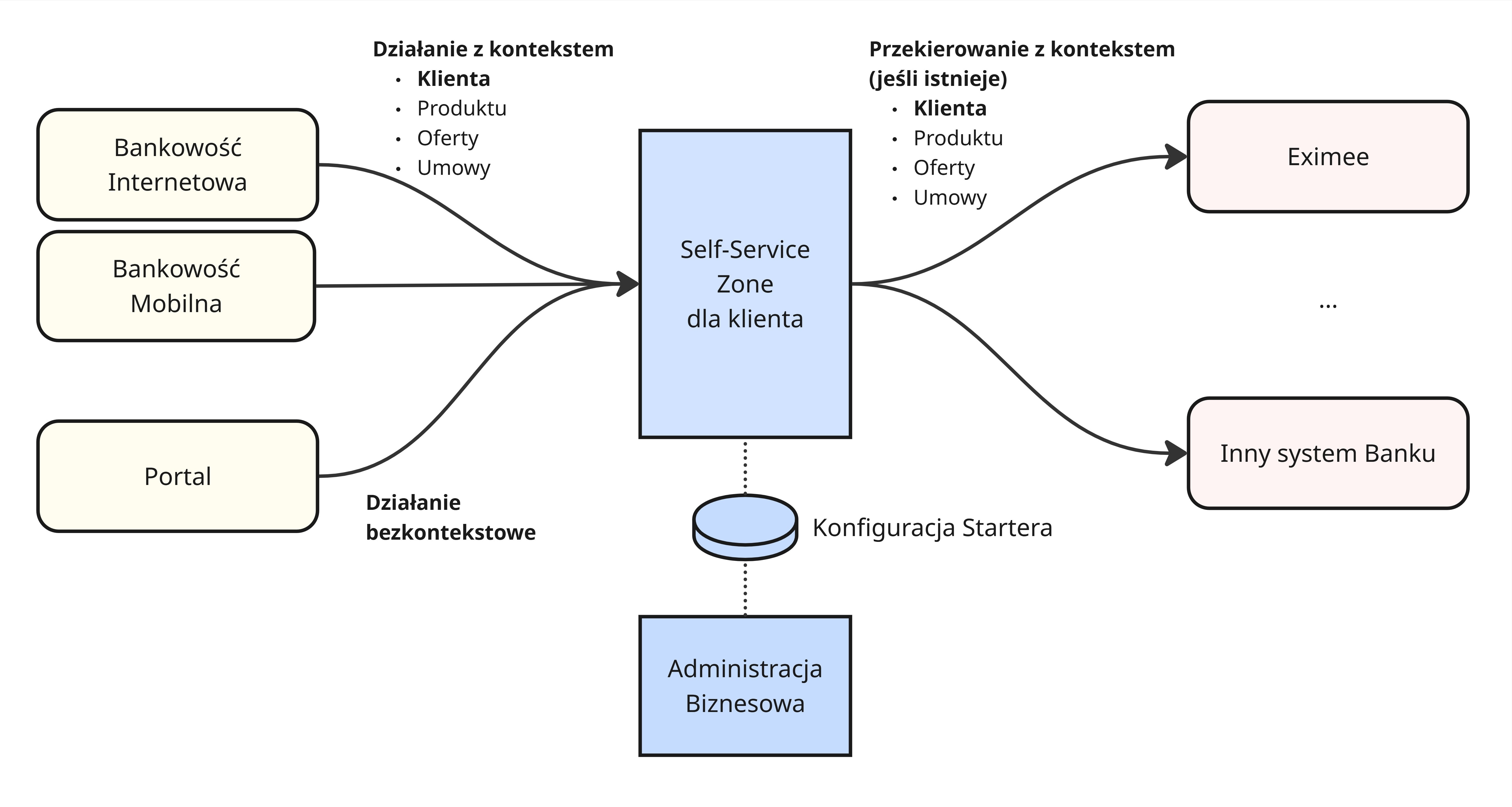
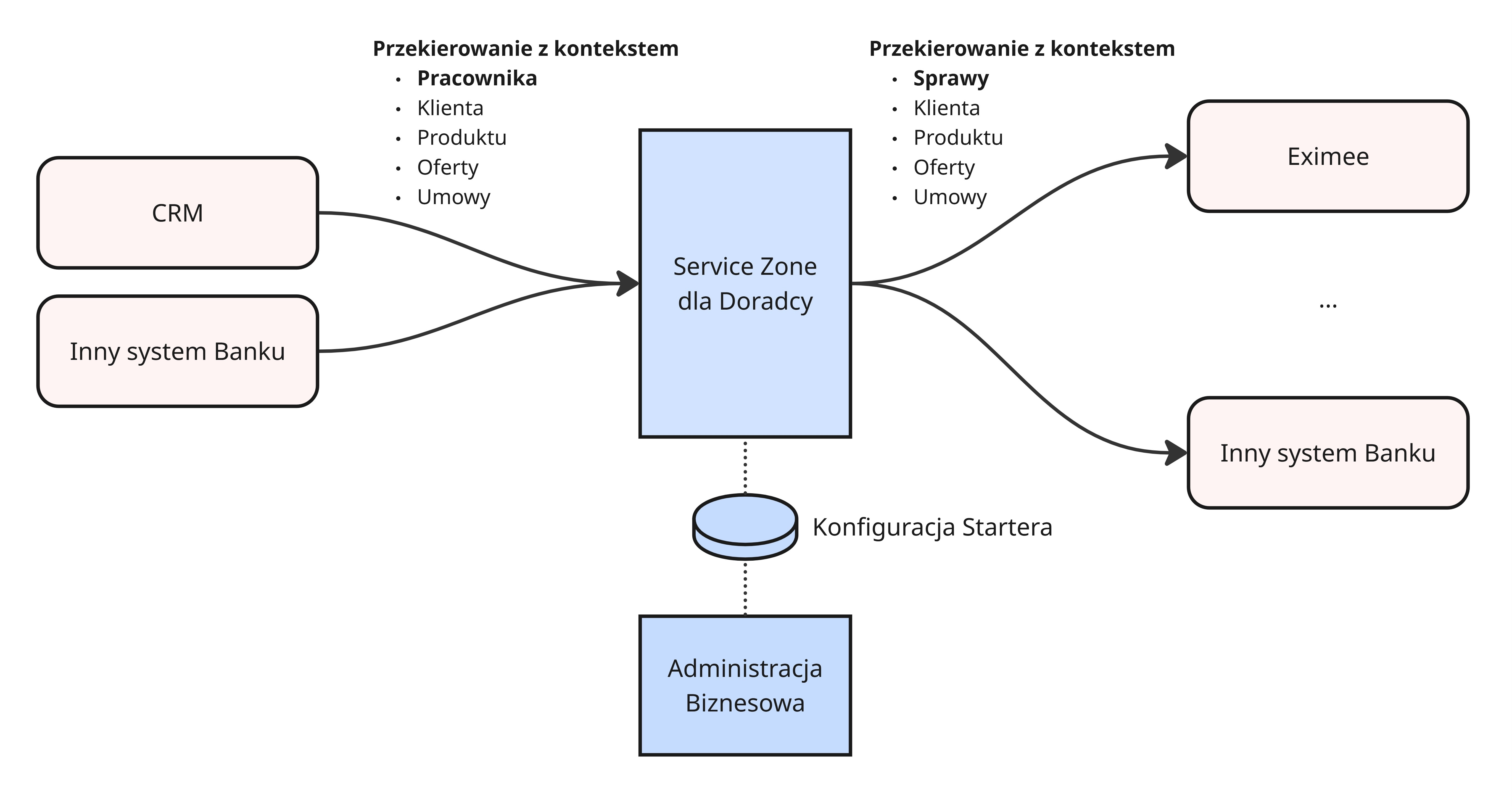
**Eximee Customer Service Zone** is a service component of the Eximee platform, designed to integrate process applications into existing banking systems — both in self-service channels and assisted channels.\
Its purpose is to provide bank customers and employees **a consistent, unified experience** in case handling, regardless of the access channel used.
## Purpose and role of the component
Customer Service Zone acts as **a presentation and navigation layer**, which connects various process applications into one intuitive ecosystem for handling customer cases.\
It enables:
* launching processes in various banking systems,
* redirecting the user to the appropriate forms, functions, or screens in target systems while preserving context,
* consistent grouping of processes and navigation,
* access to cases depending on the user's permissions (customer or employee).
## Universal access across multiple channels
The Customer Service Zone can be launched in various contexts, adapting to the user's needs and permissions.\
As a result, it supports full integration with the existing banking infrastructure and the strategy **Omnichannel**.
### Available contexts
* **Public portal** – access for unauthenticated users (e.g. starting an application or onboarding process).
* **Online and mobile banking** – full functionality for logged-in customers, taking into account the customer's context and products.
* **Channels supported by employees (assisted channels)** – access from employee applications, taking into account the operator's permissions and the context of the represented customer.
Thanks to the Starter Configuration, Customer Service Zone automatically recognizes the context in which the user is operating and directs them to the appropriate process, form, or banking system.
## Intuitive organization and navigation
The component gives users quick access to processes that can be carried out in a given channel.
### Main elements
* **Process grouping** – organization into logical categories corresponding to:
* business or thematic areas (e.g. Loans, Transactions, Cards),
* product or case types (e.g. Mortgage loan, Card complaint, Business account).\
These groups are used when building screens and navigation within the Service Zone.
* **Quick access panel** – a set of the most important processes or functions always available at hand, e.g. starting an application, viewing statuses, or contacting an advisor.
## Launching processes in multiple systems
**Eximee Customer Service Zone** enables invoking processes carried out in various banking systems, both on the Eximee platform and outside it.\
Thanks to the mechanism **of context-based redirection**, the user is taken directly to the appropriate place to carry out the process – e.g. a form in Eximee, a function in the CRM system, or a dedicated screen in electronic banking.\
At the same time, the following is preserved:
* customer context,
* product or offer context,
* case context (ID, status, handoff parameters).
## Searching and filtering processes
Customer Service Zone includes **an advanced process search engine**, which enables quick finding of the needed function or case.\
Features:
* real-time search while typing,
* matching by process names, descriptions, and groups,
* tolerance for typos and missing diacritical marks,
* support for keywords (tags) – e.g. “loan”, “business account”, “complaint”.
## Visual consistency and branding
The appearance and style of the component are fully adapted to the bank's visual identity.\
The styling is developed together with the bank's **UI/UX team** and aligned with its **Design System**, so that Customer Service Zone remains visually consistent with other channels, applications, and front-end systems.
## Key features of Eximee Customer Service Zone
* Integration with existing banking systems (portals, banking, CRM).
* Ability to operate in different channels – public, logged-in, and employee.
* Grouping and filtering processes by type, area, and product.
* Quick access panel for the most frequently used functions.
* Support for context-based launching of processes in multiple systems.
* Styling aligned with the bank's Design System.
* Responsiveness (RWD) and accessibility (WCAG).
* Flexible configuration and extensibility without the need for code changes.
## Summary
**Eximee Customer Service Zone** serves as the central point of contact for customers and employees with the bank's business processes.\
It combines low-code flexibility with system integration, providing quick access to processes, documents, and cases regardless of the access channel.\
As a result, it becomes the foundation of a modern customer service architecture in the approach **Omnichannel**, ensuring a consistent user experience across the entire banking ecosystem.
---
# Agent Instructions
This documentation is published with GitBook. GitBook is the documentation platform designed so that both humans and AI agents can read, navigate, and reason over technical content effectively. Learn more at gitbook.com.
## Querying This Documentation
If you need additional information that is not directly available in this page, you can query the documentation by asking a question.
Perform an HTTP GET request on the following URL with the `ask` and `goal` query parameters:
```
GET https://docs.eximee.com/documentation/documentation-en/wprowadzenie/architektura-platformy/rozszerzenia-platformy/customer-service-zone.md?ask=&goal=
```
`ask` is the immediate question: it should be specific, self-contained, and written in natural language.
`goal` is what the user is ultimately trying to achieve, the reason they need the answer. Sharing it helps GitBook give you a better, more relevant answer. A goal is most helpful when it describes the outcome the user wants rather than restating the question. For example, with `ask=how do I create an API token`, a goal like `automate deployments from our CI pipeline` lets GitBook tailor the answer to that use case.
The response will contain a direct answer to the question and relevant excerpts and sources from the documentation.
Use this mechanism when the answer is not explicitly present in the current page, you need clarification or additional context, or you want to retrieve related documentation sections.