> For the complete documentation index, see [llms.txt](https://docs.eximee.com/llms.txt). Markdown versions of documentation pages are available by appending `.md` to page URLs; this page is available as [Markdown](https://docs.eximee.com/documentation/documentation-en/budowanie-aplikacji/aplikacja-biznesowa/wersjonowanie.md).
# Versioning
In Eximee, every **application element** — e.g. a form, process, script, or content — has its own version history, managed directly in the repository. The versioning mechanism enables safe introduction of changes, tracking of modifications, and easy restoration of earlier versions if needed.
### **Major and minor versions**
The versioning system distinguishes two levels of versions:
* **Major versions (major)** — marked with successive whole numbers: `1`, `2`, `3`, etc.\
They are used to mark changes that affect the operation of the application or its structure (e.g. changes to the data schema, process logic, or relationships between components).
* **Minor versions (minor)** — marked as a decimal number relative to the major version: `1.1`, `1.2`, `1.3`, etc.\
They are used when introducing smaller changes that do not affect the application interface and do not require adjustments to dependent components (e.g. text changes, layout fixes, cosmetic modifications).
{% hint style="info" %}
**The first version of each application element is `1.0`.**
{% endhint %}
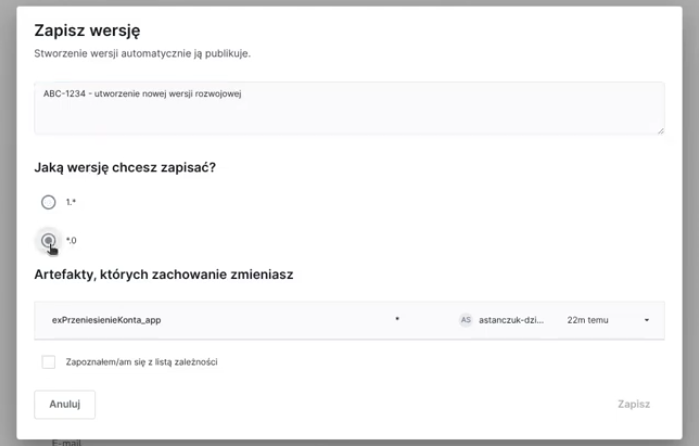
When saving changes, the user decides whether to create **a new major version** or **a minor one**. Versioning is done manually — the system does not enforce automatic version number increments.
### **Draft version (draft)**
When an application element is edited, its **draft version (draft)**. A draft version is a temporary copy of the edited element that does not yet affect the operation of the application and is not visible to other users.
Key rules for working with a draft version:
* For a given **major version branch** (`e.g. 3.*`) only **one draft version** can exist at a time.
* Editing the draft version **locks the branch**, which means that other users cannot make changes to the same major version at the same time.
* The lock is removed automatically when the user:
* saves the draft version as a new `major` or `minor`,
* or discards the draft version without saving it.
A draft version allows safe experimentation with changes — only saving (promoting) the version to the repository makes it available in the history and usable in applications.
### **Version history**
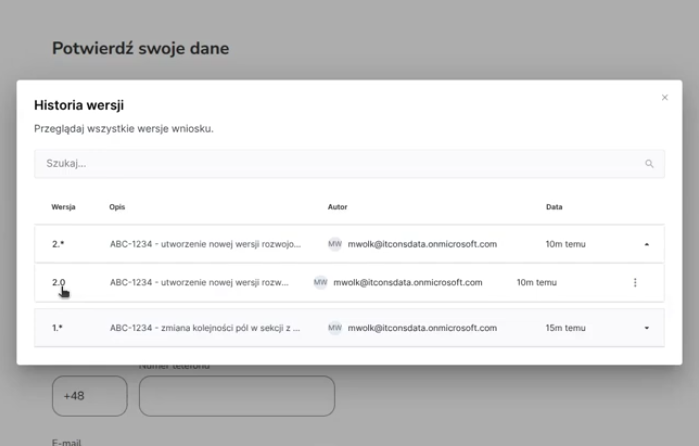
Each application element has a tab available from the interface **Version history**, where you can see:
* all approved versions (`1.0`, `1.1`, `2.0` etc.),
* change descriptions (if added when saving),
* author and modification date,
* access to compare the contents between versions,
* the ability to restore a selected version as a new draft.
This makes it easy to trace changes over time and maintain full control over the development of each application element.
Figure 1. "Version History" view
In Figure 1, we see the version history of the request template, which has many major versions. The major version 11.\* has 5 minor versions (from 11.0 to 11.4).
### Branching off the main branch, including the production one
Branching off the main branch is especially recommended before starting major changes — such as process redesign, changes to the data structure, or the development of new functionality — that could affect the stability of the running application.
The mechanism of branching off the main branch is used to separate a stable version (e.g. production) of the application or request from work on new functionalities. Branching off the branch consists of creating a new major version, which serves as an independent space for further development.
Figure 2. Separation of production and development versions
In practice, this means that version 1.\* (e.g. 1.12) can still run in production while the team works in parallel on version 2.\*, developing it independently until it is ready for deployment. This approach makes it possible to maintain a stable version of the application and develop the next one at the same time, minimizing the risk of errors and conflicts between changes. If needed, fixes can also be introduced in the production branch without affecting the new version under development.
Figure 3. Parallel development of version 2.0 while maintaining version 1.*
Branching off the production branch is especially recommended before starting major changes — such as process redesign, changes to the data structure, or the development of new functionality — that could affect the stability of the running application.
---
# Agent Instructions
This documentation is published with GitBook. GitBook is the documentation platform designed so that both humans and AI agents can read, navigate, and reason over technical content effectively. Learn more at gitbook.com.
## Querying This Documentation
If you need additional information that is not directly available in this page, you can query the documentation dynamically by asking a question.
Perform an HTTP GET request on the current page URL with the `ask` query parameter, and the optional `goal` query parameter:
```
GET https://docs.eximee.com/documentation/documentation-en/budowanie-aplikacji/aplikacja-biznesowa/wersjonowanie.md?ask=&goal=
```
`ask` is the immediate question: it should be specific, self-contained, and written in natural language.
`goal` is optional and describes the broader end goal you are ultimately trying to accomplish on behalf of the user. GitBook uses it to tailor the answer towards what is most useful for that goal.
The response will contain a direct answer to the question and relevant excerpts and sources from the documentation.
Use this mechanism when the answer is not explicitly present in the current page, you need clarification or additional context, or you want to retrieve related documentation sections.