> For the complete documentation index, see [llms.txt](https://docs.eximee.com/llms.txt). Markdown versions of documentation pages are available by appending `.md` to page URLs; this page is available as [Markdown](https://docs.eximee.com/documentation/documentation-en/budowanie-aplikacji/aplikacja-biznesowa/wersjonowanie/wersja-robocza-elementu.md).
# Element draft version
The draft version mechanism allows you to safely edit an application element (such as a form, process, or script) without affecting the published versions.
### **Creating a draft version**
Switching to edit mode causes the following automatic actions:
* blocking editing for other users within the given **main version** (e.g. `1.*`),
* creating **a draft version** based on the selected version (e.g. `1.8`).
{% hint style="info" %}
For each main version, there can be only **one active draft copy**. If one already exists, access to editing will be blocked until it is saved or discarded.
{% endhint %}
***
### **Working with a draft copy**
While editing, changes are saved automatically:
* **every 30 seconds**,
* and **when leaving the editor** (e.g. closing the tab, switching to another view).
The top bar of the editor displays **the time since the last save** on the server. When the editor is reopened, the draft is restored from the last saved state.
Figure 1. Draft copy information
Changes are approved by clicking the **Save as new version**button, which causes:
* all changes to be saved to the repository,
* creation of a new major or minor version,
* release of the editing lock.
***
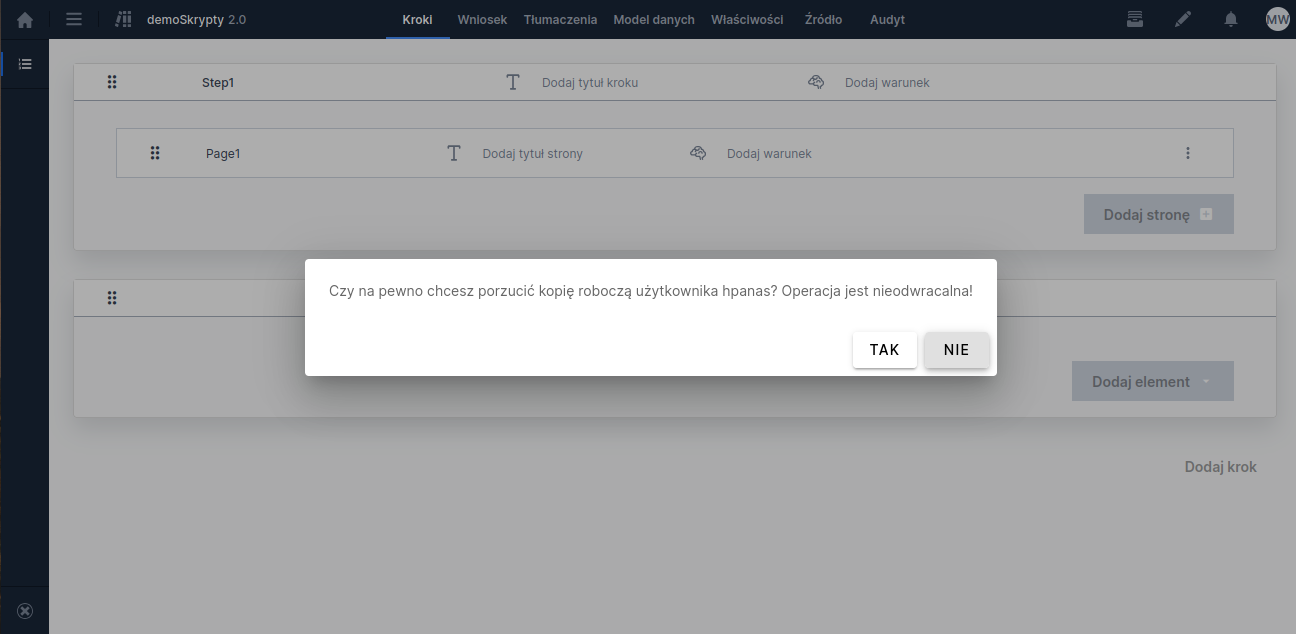
### **Discarding a draft version**
The author of the draft version can at any time отказаться from the saved changes by selecting the option from the left sidebar menu **Discard draft copy**.
This operation:
* deletes the current draft version,
* restores editing access for the given main version to other users.
Figure 2. Menu with the "Discard draft copy" option
***
### **Unlocking element editing**
If the draft version was created by another user and editing is locked, it is possible to **force unlock editing** using the option **Unlock element editing** (also in the menu on the left).
Figure 3. Menu with the "Unlock artifact editing" option
{% hint style="warning" %}
*Note: this operation is irreversible - all unsaved changes in the draft version will be permanently deleted.*
{% endhint %}
Figure 4. Confirmation popup for unlocking the artifact
---
# Agent Instructions
This documentation is published with GitBook. GitBook is the documentation platform designed so that both humans and AI agents can read, navigate, and reason over technical content effectively. Learn more at gitbook.com.
## Querying This Documentation
If you need additional information that is not directly available in this page, you can query the documentation dynamically by asking a question.
Perform an HTTP GET request on the current page URL with the `ask` query parameter, and the optional `goal` query parameter:
```
GET https://docs.eximee.com/documentation/documentation-en/budowanie-aplikacji/aplikacja-biznesowa/wersjonowanie/wersja-robocza-elementu.md?ask=&goal=
```
`ask` is the immediate question: it should be specific, self-contained, and written in natural language.
`goal` is optional and describes the broader end goal you are ultimately trying to accomplish on behalf of the user. GitBook uses it to tailor the answer towards what is most useful for that goal.
The response will contain a direct answer to the question and relevant excerpts and sources from the documentation.
Use this mechanism when the answer is not explicitly present in the current page, you need clarification or additional context, or you want to retrieve related documentation sections.