> For the complete documentation index, see [llms.txt](https://docs.eximee.com/llms.txt). Markdown versions of documentation pages are available by appending `.md` to page URLs; this page is available as [Markdown](https://docs.eximee.com/documentation/documentation-en/budowanie-aplikacji/aplikacja-biznesowa/porownywanie-zmian.md).
# Comparing changes
Comparing changes in application elements allows you to quickly check the differences between two versions of the same component or between two exported elements. This makes it possible to:
* analyze changes introduced by the team,
* verify dependency compatibility,
* prepare components for migration or deployment.
These features are available in the **Difference** and **Compare artifacts**, located in the **Overview** module in Eximee Designer.
***
## The **Difference** tab – comparison of versions of the same element
It allows you to compare two versions of the same application element, e.g. a form, script, or composite component.
**How does it work?**
* The user selects an element (e.g. a form) from the list.
* Then they select two versions: the "left" and the "right" one.
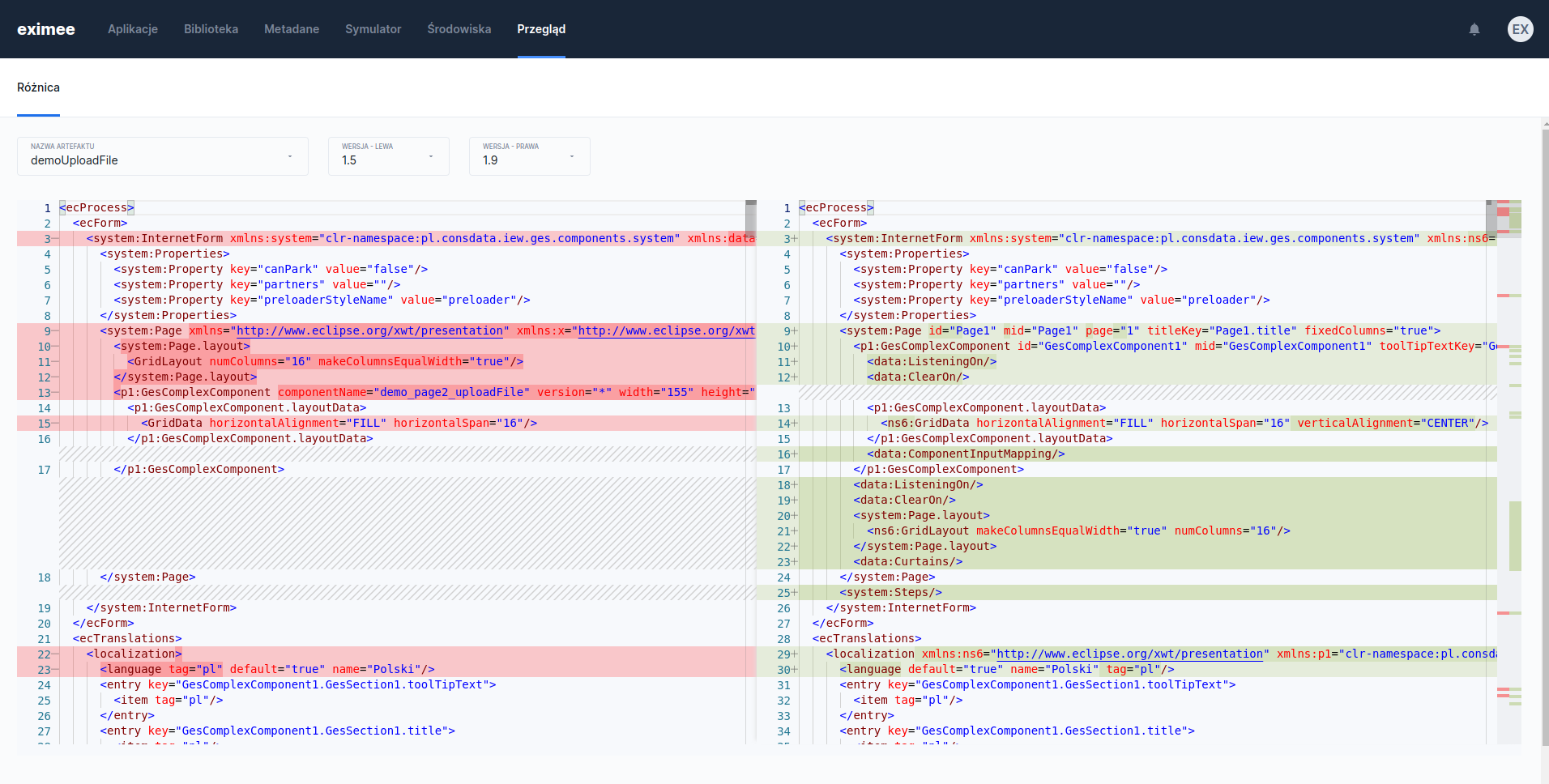
* The system presents the differences between the versions – these can be changes in content, code, structure, or properties.
Figure 1. Comparison of the artifact in versions 1.5 and 1.9
{% hint style="info" %}
**Supported element types:**
* forms
* composite components
* business components
* scripts
* script validators
* script tasks
* content
* documentation
{% endhint %}
This functionality allows for a detailed review of changes before saving a new version, during historical review, or in team collaboration.
***
## The **Compare artifacts** – comparison of two exported elements
It allows comparison of two `.xml` or `.json` files with exported application elements – focusing on their **dependencies**.
**How does it work?**
The user drags two files into the **drag & drop**.
Figure 2. Artifact comparison window
The system analyzes the dependencies and presents a list of differences.
Figure 3. Comparison of two exported artifacts
**Types of detected differences:**
* ➕ **New dependency** – appears only in the second file.
* ➖ **Deleted dependency** – appeared only in the first file.
* 🔁 **Dependency version difference** – the dependency refers to the same element, but with a different version.
If no differences are detected, the message appears: **"No data to display"**.
#### When to use comparison?
* Before publishing a new version of a component – to make sure what has changed.
* During code review – to assess the changes introduced by the team.
* During migration – to compare exports between environments.
* During integration – to make sure that the dependencies are as expected.
---
# Agent Instructions
This documentation is published with GitBook. GitBook is the documentation platform designed so that both humans and AI agents can read, navigate, and reason over technical content effectively. Learn more at gitbook.com.
## Querying This Documentation
If you need additional information that is not directly available in this page, you can query the documentation dynamically by asking a question.
Perform an HTTP GET request on the current page URL with the `ask` query parameter, and the optional `goal` query parameter:
```
GET https://docs.eximee.com/documentation/documentation-en/budowanie-aplikacji/aplikacja-biznesowa/porownywanie-zmian.md?ask=&goal=
```
`ask` is the immediate question: it should be specific, self-contained, and written in natural language.
`goal` is optional and describes the broader end goal you are ultimately trying to accomplish on behalf of the user. GitBook uses it to tailor the answer towards what is most useful for that goal.
The response will contain a direct answer to the question and relevant excerpts and sources from the documentation.
Use this mechanism when the answer is not explicitly present in the current page, you need clarification or additional context, or you want to retrieve related documentation sections.