> For the complete documentation index, see [llms.txt](https://docs.eximee.com/llms.txt). Markdown versions of documentation pages are available by appending `.md` to page URLs; this page is available as [Markdown](https://docs.eximee.com/documentation/documentation-en/budowanie-aplikacji/proces-biznesowy/tworzenie-procesu-biznesowego-w-bpmn-2.0/podprocesy.md).
# Subprocesses
## What is a subprocess
**Workflow subprocess** (in English *subprocess*) is a separated fragment of a larger business process that performs a specific, repetitive set of activities. It is used to organize and design workflows in a modular way - this allows complex processes to be divided into smaller, easier-to-manage parts.
Subprocesses make it easier to reuse the same procedures in different parts of the system, increase the clarity of BPMN diagrams, and enable independent testing and modification of individual stages of the process. As a result, the organization gains greater flexibility, consistency, and ease of maintenance of its business processes.
## Working with subprocesses
### Creating a subprocess
We create and save a subprocess in the same way as a process.
### Adding a subprocess to a process
When editing the process to which we want to add a previously created subprocess, we add an element of type **Task**.
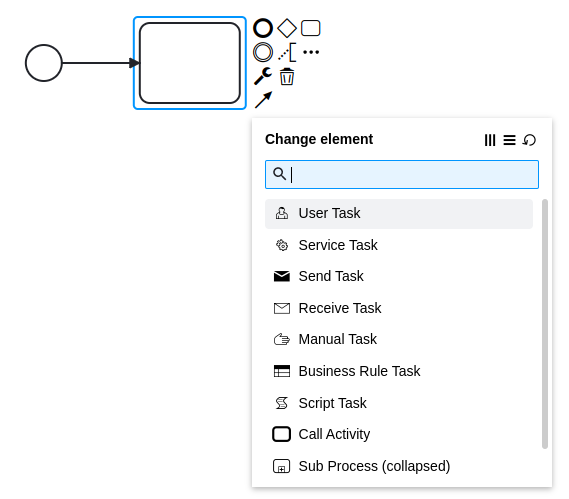
Then we change its type to **Call Activity** (context menu **Change element** will be displayed after selecting the block and clicking the key icon).
Figure 1. Task type change menu
In the next step for the selected block **Call Activity** in the right panel we expand section **Called element**. First we set the element type (property **Type**) to **BPMN**, and after expanding the next fields we enter in the field **Called element** the process created earlier - placing it as a subprocess in the edited process.
Figure 2. "Call Activity" menu
### Subprocesses and dependencies
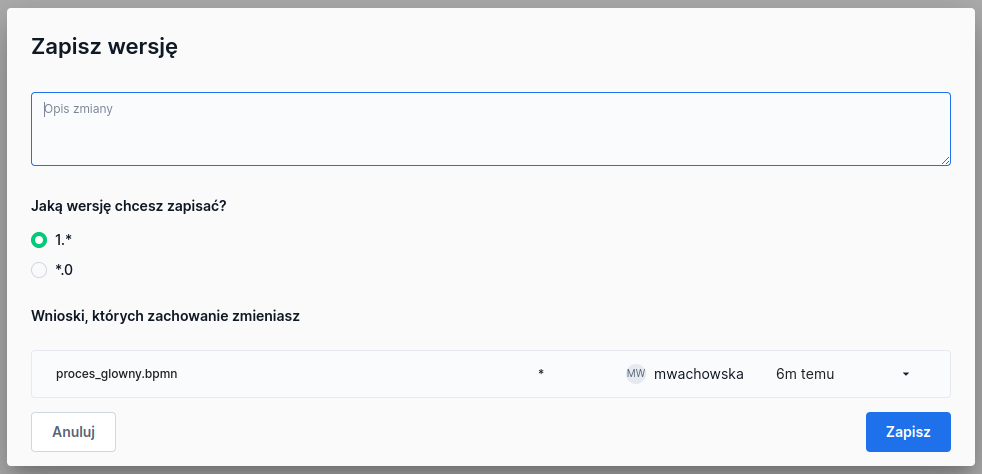
Since a subprocess is part of another process, when saving the process definition in the version save window, we will receive information about dependent artifacts.
Due to such a dependency, it is impossible to delete the subprocess definition from the repository.
{% hint style="info" %}
Deleting the main process is possible and is not confirmed by any window. However, a message appears at the bottom of the screen allowing you to undo this operation.
{% endhint %}
When downloading the process artifact that is the main process (option **Download** in the context menu of a given process), the subprocess of this process will also be downloaded.
```xml
PD94bXZlbnQ{...}XRpb25zPgo=/developers/mwachowska/16podproces.bpmnbpmnPD94bW{...}lvbnM+Cg==/developers/mwachowska/13proces_glowny.bpmnbpmn
```
When importing a process with subprocesses into an application, they will also be automatically added to that application
### Versioning and use of subprocesses
In the field **Binding** we can specify the subprocess version.
* By default, latest is set, meaning always the newest version.
* However, we can indicate a specific version (version) or bind the subprocess version to the deployment of the main process (deployment).
The same subprocess **can be used in many main processes**, therefore its update may affect all related processes. After testing and before production deployment, it is recommended to bind it to a specific stable version.
Open instances always use the subprocess version that existed when the main process was started. New instances, if Binding = latest, will use the new subprocess version.
---
# Agent Instructions
This documentation is published with GitBook. GitBook is the documentation platform designed so that both humans and AI agents can read, navigate, and reason over technical content effectively. Learn more at gitbook.com.
## Querying This Documentation
If you need additional information that is not directly available in this page, you can query the documentation by asking a question.
Perform an HTTP GET request on the following URL with the `ask` and `goal` query parameters:
```
GET https://docs.eximee.com/documentation/documentation-en/budowanie-aplikacji/proces-biznesowy/tworzenie-procesu-biznesowego-w-bpmn-2.0/podprocesy.md?ask=&goal=
```
`ask` is the immediate question: it should be specific, self-contained, and written in natural language.
`goal` is what the user is ultimately trying to achieve, the reason they need the answer. Sharing it helps GitBook give you a better, more relevant answer. A goal is most helpful when it describes the outcome the user wants rather than restating the question. For example, with `ask=how do I create an API token`, a goal like `automate deployments from our CI pipeline` lets GitBook tailor the answer to that use case.
The response will contain a direct answer to the question and relevant excerpts and sources from the documentation.
Use this mechanism when the answer is not explicitly present in the current page, you need clarification or additional context, or you want to retrieve related documentation sections.