# Import CSV dictionary

The import mechanism allows you to populate the dictionary with data from a CSV file. This makes it possible to edit the dictionary content in any program and then transfer the result to Eximee Designer.

{% hint style="info" %}
Rules for CSV import:

* only CSV files can be imported,
* the separator in the file must be a comma,
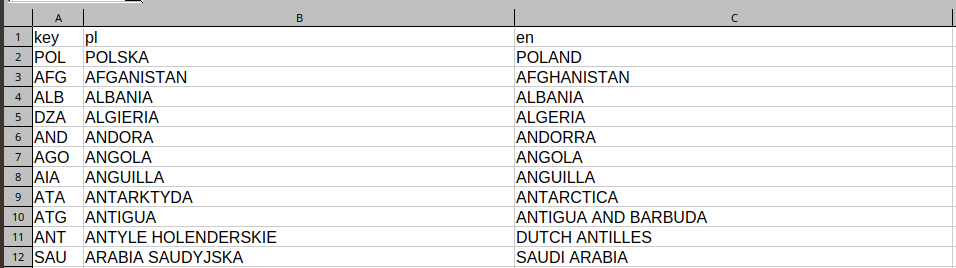
* the CSV file must have a first row with a header that specifies the column names:
  * the "key" column must be first,
  * the remaining columns specify languages, e.g. key,pl,en,
* keys and languages must be unique,
* the import operation completely overwrites the dictionary content — existing keys and languages before import will be deleted.
  {% endhint %}

<figure><img src="/files/0d6a959f678b493c718669fba24c6bf1f849c897" alt="" width="536"><figcaption><p align="center"><em><strong>Figure 1.</strong> Example of a dictionary in CSV format to be imported</em></p></figcaption></figure>

## CSV file import

Import is possible on an existing request in edit mode. To make the data appear in a new dictionary, first create that dictionary (instructions: [Creating a new dictionary](/documentation/documentation-en/budowanie-aplikacji/interfejs-uzytkownika/slowniki/tworzenie-nowego-slownika.md)).

<figure><img src="/files/ba85d5bbaf2615ee60a1de6431c95d1a092b9303" alt="" width="563"><figcaption><p align="center"><em><strong>Figure 2.</strong> New dictionary window with the Import from csv button</em></p></figcaption></figure>

{% stepper %}
{% step %}

#### Starting the import

Clicking the **Import from csv** button will open a popup allowing you to add a CSV file.
{% endstep %}

{% step %}

#### Selecting a CSV file

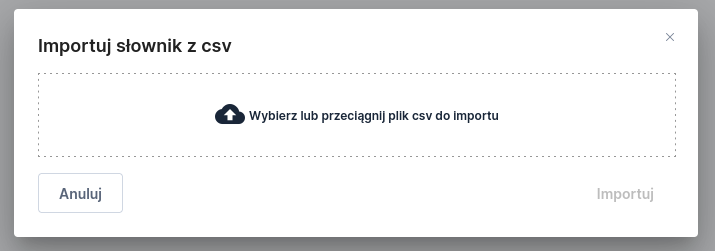
Add a file by clicking the area **Choose or drag a csv file to import** or drag the file into this field.

<figure><img src="/files/e88767184d13db6b58f8fdd137e1d0f88e2a3a7e" alt="" width="536"><figcaption><p align="center"><em><strong>Figure 3.</strong> Dictionary import window with no file selected</em></p></figcaption></figure>

<figure><img src="/files/91476411be24154a4746922ed3d1cc4a897eaffa" alt="" width="530"><figcaption><p align="center"><em><strong>Figure 4.</strong> Dictionary import window with a selected file</em></p></figcaption></figure>
{% endstep %}

{% step %}

#### Starting the import

After selecting a file, click the **Import** button — the data import will begin. If the file is invalid or another error occurs, an error message will appear at the bottom of the window.
{% endstep %}

{% step %}

#### Saving the dictionary

After a successful import, save the dictionary so that the entered data is preserved.

<figure><img src="/files/39c2a00960abd3d2977a74665247bcd7a5edc85c" alt="" width="563"><figcaption><p align="center"><em><strong>Figure 5.</strong> Completed dictionary after a successful import</em></p></figcaption></figure>
{% endstep %}
{% endstepper %}

## Possible issues <a href="#importslownikacsv-mozliweproblemy" id="importslownikacsv-mozliweproblemy"></a>

The file will not be imported in the case of:

* an incorrect CSV structure,
* missing first row with a header,
* the "key" column is not first,
* duplicate keys,
* duplicate languages.

In such cases, an error message will appear:

<figure><img src="/files/663ace29da7cf105601ffe97bdde0cbea9560092" alt=""><figcaption><p align="center"><em><strong>Figure 6.</strong> Error message during CSV file import</em></p></figcaption></figure>


---

# Agent Instructions: Querying This Documentation

If you need additional information that is not directly available in this page, you can query the documentation dynamically by asking a question.

Perform an HTTP GET request on the current page URL with the `ask` query parameter:

```
GET https://docs.eximee.com/documentation/documentation-en/budowanie-aplikacji/interfejs-uzytkownika/slowniki/import-slownika-csv.md?ask=<question>
```

The question should be specific, self-contained, and written in natural language.
The response will contain a direct answer to the question and relevant excerpts and sources from the documentation.

Use this mechanism when the answer is not explicitly present in the current page, you need clarification or additional context, or you want to retrieve related documentation sections.