# Modification (runtime) of business configurations

From the Eximee Dashboard application, it is possible to modify the configuration.

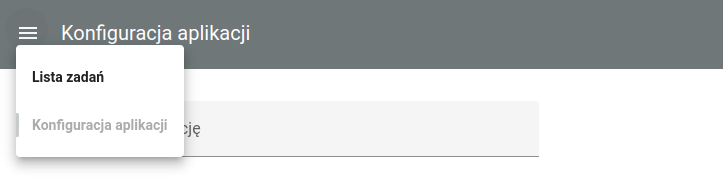
For users who have the assigned permission **feature\_config\_edit** the tab is available **Application configuration**.<br>

<figure><img src="/files/5f1e6296002a8b6cc7a94cef2fbb8492b665c35e" alt=""><figcaption><p><em><strong>Figure 1.</strong> Configuration modification from Eximee Dashboard - the 'Application configuration' tab</em></p></figcaption></figure>

Tab **Business configuration** displays "**default parameters"** defined for each environment and "**overridden parameters"** for the environment on which the Eximee Dashboard application is running.

Default parameters can be modified from the Eximee Designer application - [Configuration from the Low-code level](/documentation/documentation-en/zarzadzanie-aplikacja-biznesowa/zarzadzanie-konfiguracja/konfiguracja-aplikacji-biznesowej-serwer-konfiguracji/konfiguracja-z-poziomu-low-code.md).

Overridden parameters can be modified from the Eximee Dashboard application in the tab **Business configuration**.

<figure><img src="/files/01240de9bc0aacefb7f290e0dbeb8dc68c8bd023" alt=""><figcaption><p><em><strong>Figure 2.</strong> Configuration modification from Eximee Dashboard - configuration modification screen</em></p></figcaption></figure>

{% hint style="info" %}
Currently, the maximum size of stored configuration for a single application is **16MB**.
{% endhint %}


---

# Agent Instructions: Querying This Documentation

If you need additional information that is not directly available in this page, you can query the documentation dynamically by asking a question.

Perform an HTTP GET request on the current page URL with the `ask` query parameter:

```
GET https://docs.eximee.com/documentation/documentation-en/zarzadzanie-aplikacja-biznesowa/zarzadzanie-konfiguracja/konfiguracja-aplikacji-biznesowej-serwer-konfiguracji/modyfikacja-runtime-konfiguracji-biznesowych.md?ask=<question>
```

The question should be specific, self-contained, and written in natural language.
The response will contain a direct answer to the question and relevant excerpts and sources from the documentation.

Use this mechanism when the answer is not explicitly present in the current page, you need clarification or additional context, or you want to retrieve related documentation sections.
