> For the complete documentation index, see [llms.txt](https://docs.eximee.com/llms.txt). Markdown versions of documentation pages are available by appending `.md` to page URLs; this page is available as [Markdown](https://docs.eximee.com/documentation/documentation-en/eksploatacja-aplikacji/obsluga-procesow/eximee-dashboard/rejestracja-zdarzen-procesu.md).
# Process event logging
## Event registration
This is an event log in which events occurring in the case are recorded chronologically. To enable event registration, set the following parameter in the platform configuration: CASE\_HISTORY\_ENABLED="true"
We register two types of events:
**System** - performed by users (Client and Employee):
* case creation,
* taking over a manual step by the user (claim),
* saving a manual step by the user (saving the task - interrupting execution - there is no unClaim here),
* putting aside a manual step by the user (unClaim),
* completion of a manual step by the user,
* case completion (end of the process),
* changing the case priority.
**Business** - events recorded in History by the process, at points defined in the process (e.g. in an automated step or from the form).
A business event has common attributes:
* event type: business,
* event kind,
* assigned person,
* event description,
* structure with event attributes,
* event date.
## System Events
### Configuration
To use the plugin for adding individual system events to the topic, set the router-api endpoint in the configuration via config ROUTER\_ENGINE\_CASE\_HISTORY\_ROUTER\_API\_URL, e.g.:
```
ROUTER_ENGINE_CASE_HISTORY_ROUTER_API_URL=http://eximee-router-api:8080/
```
### Automatic publication of events for types
* **PROCESS\_START** - Process start
* **PROCESS\_END** - Process end
* **CLAIM\_TASK** - User assignment
* **UNCLAIM\_TASK** - Unassigning user
* **ASSIGNEE\_TASK** - User assignment by another user
* **SEND\_USER\_TASK** - Sending user task
* **SAVE\_TASK** - Task save
* **PROCESS\_PRIORITY\_CHANGE** - Task priority change
## Business Events
### Configuration
To register business events, add the following dependency to the business application:
**events-connector**
```xml
com.consdata.eximeeevents-connector${eximee-platform.version}
```
Then add the configuration:
```
events.connector.rest.events.url=${ROUTER_API_URL}
```
where ROUTER\_API\_URL is the address of the router-api application.
Then in the application code, e.g. in the Camunda task handler, inject the bean **CaseHistoryBusinessMessageConnector** and call the publish method on it, passing a BusinessMessage object.
```java
caseHistoryBusinessMessageConnector.publish(BusinessMessage.builder()
.businessKey(externalTask.getBusinessKey()) // Business process key - required
.eventCode("Sending notification") // Event code that will be displayed on the case history list - required
.processInstanceId(externalTask.getProcessInstanceId()) // Process identifier - required
.processKey(externalTask.getProcessDefinitionKey()) // Process key - required
.processName("ProcessName") // Process name in Camunda - required
.eventDescription("Task description") // Event description that will be displayed on the case history list - optional
.userId("123456") // User identifier who performed the action - required
.params(Map.of( // Business parameters that will be displayed in the Case History tab, in the event details - optional
"Phone number", externalTask.getVariable("authorizationPhoneNumber"),
"Priority", StringUtils.defaultString(externalTask.getVariable("priority"), "NONE"))
)
.build());
```
{% hint style="info" %}
In the field `userId` pass the user's identifier, not their name. The case history list displays the name determined from this identifier, and if it cannot be determined — the identifier itself.
{% endhint %}
## Retrieving information for system events and business events
In the case of the "putting aside a manual step by the user" (unclaim) event, when invoked other than within Router 2 (i.e. directly via the Camunda API), add handling of a business event that intercepts the unclaim call.
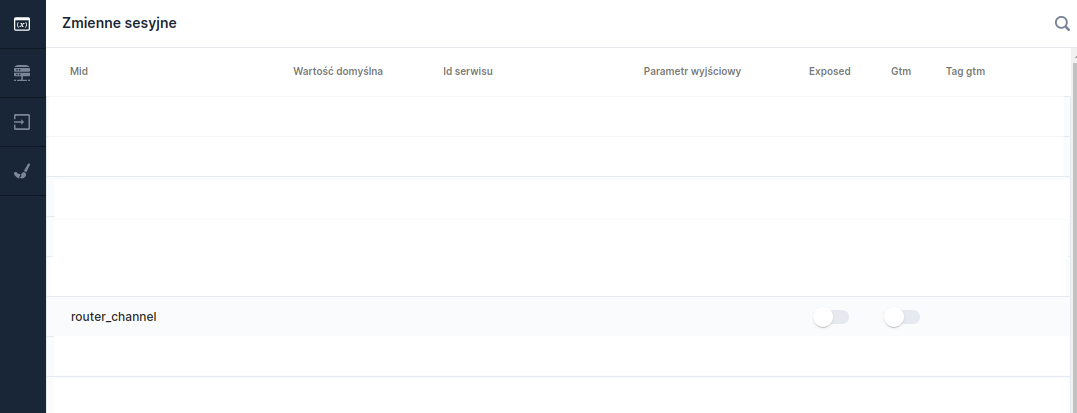
To properly record the event channel, add the variable to each request **router\_channel**:
Figure 5. Session variable "router_channel"
Figure 6. Input parameter "router_channel"
## Kafka
Kafka configuration for process event registration:
```
spring.kafka.bootstrap-servers=${KAFKA_BOOTSTRAP_SERVERS:}
event.topic.all.name=${EVENT_TOPIC_ALL_NAME:all}
event.topic.all.groupId=${EVENT_TOPIC_ALL_GROUP_ID:case-history}
```
### Topic
On the Kafka environment, a topic 'all' was created. All events, including those with process event registration, are sent to the new topic. The router-api application reads data from the all topic for the Case History tab in Eximee Dashboard.
Example event object that goes to the queue:
```js
{
"origin": "BUSINESS/SYSTEM",
"type": "START_PROCESS",
"timestamp: "1673525273",
"payload" : {
"processInstanceId": "123e4567-e89b-12d3-a456-426614174000",
"uuid": "789a4567-e89b-12d3-a456-426614174222",
"processName": "processName",
"businessKey": "businessKey001",
"processKey": "processKey",
"assignee" : "user001",
"eventDescription": "Description0001",
"params": {
"Label 1": "Value 1",
"Label 2": "Value 2"
}
}
}
```
### Error handling
In the event of an error while retrieving an event, the error information goes to the log **eximee-events-errors.log**.
Example error entry:
\[router2-api-docker] 2023-03-03 15:14:34.074 \[key=**c1411d4a-3d9e-47fc-9970-711138451a06**]\[offset=43]\[value=**EventData(origin=SYSTEM, type=PROCESS\_PRIORITY\_CHANGE, timestamp=1673541340, payload={processInstanceId=f442acfd-877f-11ed-9beb-0242ac120003, eventDescription=Setting a high case priority, channel=EXIMEE\_DASHBOARD, processKey=kredytHipoteczny, username=user0001, params={}}**))]\[topic=all] \[org.springframework.kafka.KafkaListenerEndpointContainer#0-0-C-1] ERROR java.lang.ClassCastException: **Cannot cast java.lang.String to java.lang.Boolean**
where:
* \[router2-api-docker] - the container identifier that reported the error,
* key - event key,
* offset - message index in Kafka,
* value - the processed object,
* topic - the Kafka topic from which the event was consumed.
### Diagnostic endpoint for errors while retrieving events from case history
An endpoint was created to check whether there is an entry in the current error file for events:
***GET*** TRAEFIK\_HOST:TRAEFIK\_PORT/router-api/case-history/event/errors
Response: **false - the file is empty** **true - there are some errors in the file**
### Retrying errors
Incorrectly processed events must be manually added to the database. For this purpose, retrieve from the log **eximee-events-errors.log** the event data, e.g.:
```js
EventData(origin=SYSTEM, type=PROCESS_PRIORITY_CHANGE, timestamp=1673541340, payload={processInstanceId=f442acfd-877f-11ed-9beb-0242ac120003, uuid=f442acfd-877f-11ed-9beb-0242ac120003, eventDescription=Setting a high case priority, channel=EXIMEE_DASHBOARD, processKey=kredytHipoteczny, username=user0001, params={}}
```
then prepare the appropriate insert into the database, e.g.:
```js
INSERT INTO case_history_process_history
VALUES (default, 'SYSTEM', to_timestamp(1673541340), 'f442acfd-877f-11ed-9beb-0242ac120003', 'PROCESS_PRIORITY_CHANGE', 'user0001', 'firstName', 'lastName', 'EXIMEE_DASHBOARD', 'Setting a high case priority', '{}', 'f442acfd-877f-11ed-9beb-0242ac120003');
```
Where:
* **firstName** should be replaced with the correct employee first name (e.g. based on Keycloak data),
* **lastName** should be replaced with the correct employee last name (e.g. based on Keycloak data).
---
# Agent Instructions
This documentation is published with GitBook. GitBook is the documentation platform designed so that both humans and AI agents can read, navigate, and reason over technical content effectively. Learn more at gitbook.com.
## Querying This Documentation
If you need additional information that is not directly available in this page, you can query the documentation dynamically by asking a question.
Perform an HTTP GET request on the current page URL with the `ask` query parameter, and the optional `goal` query parameter:
```
GET https://docs.eximee.com/documentation/documentation-en/eksploatacja-aplikacji/obsluga-procesow/eximee-dashboard/rejestracja-zdarzen-procesu.md?ask=&goal=
```
`ask` is the immediate question: it should be specific, self-contained, and written in natural language.
`goal` is optional and describes the broader end goal you are ultimately trying to accomplish on behalf of the user. GitBook uses it to tailor the answer towards what is most useful for that goal.
The response will contain a direct answer to the question and relevant excerpts and sources from the documentation.
Use this mechanism when the answer is not explicitly present in the current page, you need clarification or additional context, or you want to retrieve related documentation sections.