Passing values between components or application pages

Platform Eximee Designer allows passing values from one component to another. Depending on whether the components are in the same artifact or in two different ones, value passing is done in different ways. We will also proceed differently when we only want to pass a value and differently when we want to use the passed value, for example to base visibility on it.

Passing values between components located in the same artifact

If there is a need to copy a value from one Text Field (TextField) to another or to another component, e.g. into the content of a statement or from a Combobox showing a list of identity document types to another Combobox, you can in the component to which you want to pass the value:

  • Use a script EchoServiceScript (select in the section Interactions in the field EXTERNAL DATA SOURCE window the Select service and point to that script), in which you should provide the component supplying the data as input. In the script's output parameters you must map the script output to the component attribute accordingly. This approach also gives us the ability to specify a formatter that will appropriately modify the data received from the script.

    Illustration 1. Example of an attached script "EchoServiceScript"

  • Select in the field DATA SOURCE FROM ANOTHER FIELD the component sending the data:

Illustration 2. Setting as the data source the component from which data will be taken

  • Select in the field DATA SOURCE FROM ANOTHER FIELD a session variable for which a service passing a value from another component has been defined:

    Illustration 3. Setting the session variable from which values will be passed

  • Select in the field EXTERNAL DATA SOURCE a service defined earlier on the page (having an input from the component sending the data):

    Illustration 4. Attaching "PageService"

circle-info

In all cases remember to listen to the component whose value we are copying (more on the topic: Listening and clearing).

Illustration 5. Example of copying values from Text Fields to Labels (using "EchoService", "DATA SOURCE FROM ANOTHER FIELD" and a session variable)

Applying the above instruction for a Combobox/Date (and other components that pass a value, not the presented content, label or description) would cause passing the component's value. To pass the text (description or label) you should:

  • if the content (label or description) we want to pass through DATA SOURCE FROM ANOTHER FIELD, instead of selecting the component sending the data there enter:

    • for Combobox (Combobox) append after its id $label, e.g. GesCombobox1$label:

      Illustration 6. Passing text from a Combobox component

    • for Date (DatePicker) append after its id $displayValue, e.g. GesDatePicker1$displayValue

  • if the content (label or description) we want to use in the content of another component (e.g. in a section title, add to content or label), refer to that Combobox/Date as follows:

    • for a Combobox provide the component id in curly braces preceded by a dollar sign with appended $label, e.g. ${GesCombobox1$label}:

      Illustration 7. Example of using text from a Combobox in a section title

  • for Date provide the component id in curly braces preceded by a dollar sign with appended $displayValue, e.g. ${GesDatePicker1$displayValue}.

circle-info

The list of component attributes available after "$" is described in: Component attributes.

Passing values between components located in different artifacts

If the components are not located in the same artifact (the same complex component), values must be injected into the fed artifact. It does not matter whether both complex components are on the same application page.

Passing values takes place in two stages. First, in the component that will receive the values you must define input parameters, and then in the parent artifact map the appropriate components that send the data. The first stage can vary in execution and its complexity depends on whether we only want to pass a value from component to component, or additionally want to base another action on that value, e.g. component visibility.

The general definition describing passing values to complex components is located here: Input parameters of the composite component. However, special situations of value passing are not described there.

Passing values directly

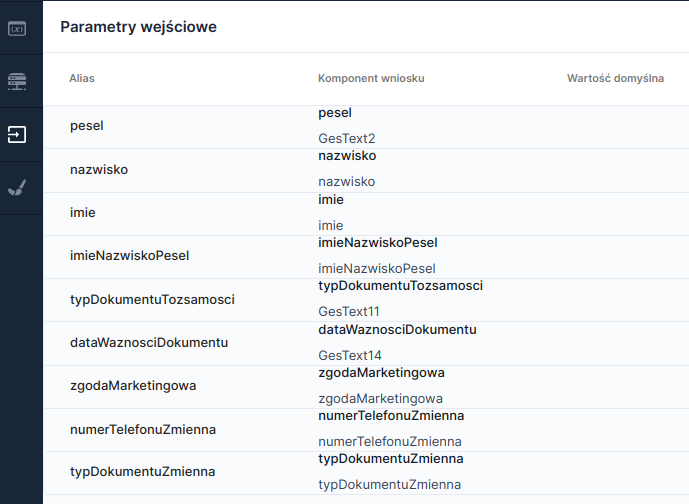
If the data being passed is to be used directly, i.e. simply pass the value from one component to another (e.g. to create a summary of data entered in the application), then in the complex component receiving the values you should define input parameters, i.e. indicate the components to which you will pass the value. To do this, select the option in the left panel Input parameters, and then Add input parameter. In the column Application component select the field from the application or the session variable to which you want to pass the value:

Illustration 8. Example of defined input parameters for components and session variables

After defining the input fields, save the complex component and open the artifact in which this component is embedded.

The next step is to map the values to the appropriate input fields, which should be done in the artifact that is the parent for both complex components (the sending and the receiving). After selecting the artifact receiving the values, in the properties of that component click the option INPUT PARAMETERS and in the drawer that opens set the sources of the retrieved values.

circle-info

If after clicking the property INPUT PARAMETERS the list of parameters is not visible, refresh the console window.

Illustration 9. Example of mapping parameters to components of the artifact sending values (e.g. GesComplexComponent1.GesTextField3) and session variables (e.g. imieNazwiskoPesel)

Passing a value to a session variable and further use of the passed value

If you want to base another action on the value passed to a component, e.g. component visibility, requirement or displaying a Combobox value in a label, the injected value should be passed to a session variable (instead of directly to a component).

The first stage, which involves indicating the elements that will receive the values, should begin with creating session variables. To do this, select the option in the left panel Session variables and click the button Add session variable. In the opened panel in the empty row created at the very top set the name of the session variable (detailed instruction here: Manage session variables). After creating session variables you should define value passing for them, which is done identically as for components (in the panel Input parameters select each session variable to which you want to pass a value).

The second stage, i.e. mapping the values to the appropriate input fields in the parent artifact, proceeds identically as for components (after selecting the artifact receiving values, in the properties of that component click the option INPUT PARAMETERS and in the drawer that opens set the sources of the retrieved values).

Examples of using values passed to a session variable are described in Manage session variables and below.

Various examples of passing values

Feeding a label (Text component) directly from another field

  • in the artifact to which you want to pass the value define that label as an input field (in the panel Input parameters),

  • in the parent artifact map the appropriate component that should pass data to the label (property INPUT PARAMETERS of the complex component).

Feeding a label from several session variables

  • in the artifact to which you want to pass the value create session variables and set them as input fields (in the panel Input parameters),

  • in the label you want to feed, in the property Content enter the variable names in the dollar schema {variable_name} (i.e. e.g. ${firstName}); you can add any text before or after the reference to the session variable, e.g. Ms ${firstName},

  • in the label you want to feed add listeners for the used variables (section Interactions, button List in the subsection Listeners),

  • in the parent artifact map the appropriate components that should pass a value to the created session variables (property INPUT PARAMETERS).

    Illustration 10. Example of using session variables (first name and last name) in the "Label" component to pass a value

Feeding a label with the value of a Combobox

Feeding a label directly with a Combobox value would result in displaying the key of the selected value, therefore it is necessary to use the following instruction:

  • in the artifact to which you want to pass the value define that label as an input field (in the panel Input parameters)

  • in the parent artifact map the appropriate Combobox that should pass data to the label (property INPUT PARAMETERS of the complex component)

  • in the xml source of the parent artifact add $label after the id of the Combobox that passes the value, i.e. if mapping was set to Combobox1, then in the record <data:InputMapping componentId="GesComplexComponent1.GesCombobox1" alias="typDokumentuTozsamosci"/>) for the id you should enter $label (here "GesComplexComponent1.GesCombobox1$label")

Feeding a label with a value from a Date (DatePicker), Radio Group and others

Feeding a label directly from a Date will result in displaying the selected date value as a timestamp, therefore it is necessary to use the following instruction:

  • in the artifact to which you want to pass the value define that label as an input field (in the panel Input parameters),

  • in the parent artifact map the appropriate date component that should pass data to the label (property INPUT PARAMETERS of the complex component),

  • in the xml source of the parent artifact in the line responsible for mapping to the Date component append after the component id $displayValue.

The above instruction also applies to Radio Group, Product Selection and other components that pass a value and not the displayed content, label or description. In the described way the value can be passed to a label, but also to a Text Field or Formatted Content (TextContent) component.

Feeding a session variable on another component with the value of a Combobox

If there is a need to feed a session variable or several components with the value of a Combobox located in another artifact, you should pass to that variable the actual value, not its key. To do this it is worth creating a technical field to which in the field DATA SOURCE FROM ANOTHER FIELD we add $label. In this way the technical field already holds the Combobox value and we can map this value to any artifact.

See also: Input parameters of the composite component.

circle-info

In one complex component values can be passed directly to a component as well as to session variables. The method of passing depends on the further use of the injected values.

Last updated

Was this helpful?