> For the complete documentation index, see [llms.txt](https://docs.eximee.com/llms.txt). Markdown versions of documentation pages are available by appending `.md` to page URLs; this page is available as [Markdown](https://docs.eximee.com/documentation/documentation-en/budowanie-aplikacji/interfejs-uzytkownika/formularze/tworzenie-formularza/zapis-tymczasowy/mechanizm-blokowania-statusow.md).
# Status locking mechanism
{% hint style="info" %}
Availability of functionality depends on the license and may not be available in all deployments.
{% endhint %}
During parking and unparking, FormStore rules may trigger that would want to change the request status. There could then be 2 requests with the same number, but different statuses (e.g. PARKED and ABANDON). To prevent this, the **status locking mechanism**.
## Locking status changes
Locking status changes occurs when a request is unparked. In special cases, also when parking. Then the value of the **locking flag (unparked) is set to "true" (locked)**. It informs that any status changes **should not happen**. The request is then held in its current state.
## Unlocking status changes
Unlocking status changes occurs when parking (including automatic parking) a request. In special cases, this happens only when it is "transferred". **The locking flag (unparked) is set to "false" (unlocked)**. It informs that status changes are active.
## Automatic unlocking of status changes
Automatic unlocking of status changes is needed in the event of a request getting stuck (e.g. due to a server failure). It is then checked whether the last modification of the request was at least 1 day earlier. If so, this is a reason to unlock status changes. This happens in two cases.
### Activation of the unlocking rule
The rule goes through all requests with a locked status. If the unlocking condition is met, this request has its status changes unlocked.
### Activation of state-changing rules
State-changing rules continue to process, as before, all requests that meet their conditions. At the moment when a request has a locked status but does not meet the requirements for automatic unlocking, the status remains unchanged.
If a request has a locked status but meets the automatic unlocking condition, or if the request has an unlocked status (standard behavior), the request is unlocked for status changes, and then the changes specified in the rule take place.
## Locking flag
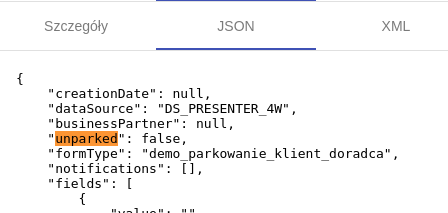
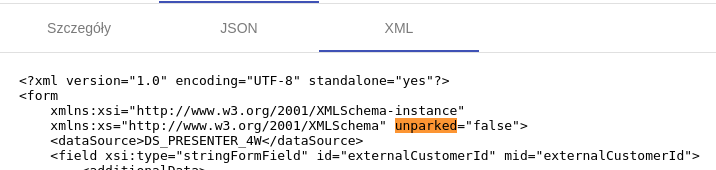
The locking flag is the "unparked" variable in the request metadata. Its state can be seen in FormStore in **JSON (Figure 1)** or in **XML (Figure 2)**.
Figure 1. FormStore request preview - JSON
Figure 2. FormStore request preview - XML
---
# Agent Instructions
This documentation is published with GitBook. GitBook is the documentation platform designed so that both humans and AI agents can read, navigate, and reason over technical content effectively. Learn more at gitbook.com.
## Querying This Documentation
If you need additional information that is not directly available in this page, you can query the documentation dynamically by asking a question.
Perform an HTTP GET request on the current page URL with the `ask` query parameter, and the optional `goal` query parameter:
```
GET https://docs.eximee.com/documentation/documentation-en/budowanie-aplikacji/interfejs-uzytkownika/formularze/tworzenie-formularza/zapis-tymczasowy/mechanizm-blokowania-statusow.md?ask=&goal=
```
`ask` is the immediate question: it should be specific, self-contained, and written in natural language.
`goal` is optional and describes the broader end goal you are ultimately trying to accomplish on behalf of the user. GitBook uses it to tailor the answer towards what is most useful for that goal.
The response will contain a direct answer to the question and relevant excerpts and sources from the documentation.
Use this mechanism when the answer is not explicitly present in the current page, you need clarification or additional context, or you want to retrieve related documentation sections.