> For the complete documentation index, see [llms.txt](https://docs.eximee.com/llms.txt). Markdown versions of documentation pages are available by appending `.md` to page URLs; this page is available as [Markdown](https://docs.eximee.com/documentation/documentation-en/budowanie-aplikacji/interfejs-uzytkownika/formularze/biblioteka-komponentow-bazowych/2-pola-wyboru/pole-wyboru-wartosci-z-listy-combobox.md).
# List value picker - Combobox
List value selector

✅ **When to use:**
* The list is long (e.g. a list of countries) or a search option is needed.
:x: **When not to use:**
* There are several options and they should be visible, or the options are mutually exclusive (e.g. YES/NO). **Use**: [Radio](/documentation/documentation-en/budowanie-aplikacji/interfejs-uzytkownika/formularze/biblioteka-komponentow-bazowych/2-pola-wyboru/radio.md) / [Tile](/documentation/documentation-en/budowanie-aplikacji/interfejs-uzytkownika/formularze/biblioteka-komponentow-bazowych/2-pola-wyboru/kafel-tile.md).
* The selection concerns an object with additional data (e.g. an account with a balance). **Use**: [AccountSelector](/documentation/documentation-en/budowanie-aplikacji/interfejs-uzytkownika/formularze/biblioteka-komponentow-bazowych/2-pola-wyboru/wybor-rachunku-accountselector.md).
The list value selector is a component that requires a data source. To do this, in the component panel **Properties** go to the section **Interactions** and select **External data source**. Then, in the window that appears, click **Select a service** and search the list for the appropriate **dictionary, service** or **script**. Each of these elements is marked on the list with a different icon. After selecting the appropriate data source, in the section **External data source** its name and type information are displayed:
* DICTIONARY - if a dictionary was selected,
* EDS - if a service was selected,
* SCRIPT - if a script service was selected.
Details: [Attaching the dictionary data source](/documentation/documentation-en/budowanie-aplikacji/interfejs-uzytkownika/formularze/praca-z-komponentami-bazowymi/zasilanie-wartosciami-z-zewnetrznych-zrodel/podpiecie-slownikowego-zrodla-danych.md).
## Component properties
| Eximee Designer property | Attribute name in the Source | Description |
| ---------------------------------------------------------------------------- | ---------------------------- | ------------------------------------------------------------------------------------------------------------------------------------------------------------------------------------------------------------------------------------------------------------------------------------------------------------------------------------------------------------------------------------------------------------------------------------------------------------------------------------------------ |
| **Number of characters before search starts** (section **Basic properties**) | minTextLenghtToSearch | Specifies after how many entered characters the component values should be searched. The availability of this functionality depends on the license and may not be available in all deployments. |
| **Enable search option** (section **Basic properties**) | searchable |
Enabling the search option (by default the property is not selected) - depending on the license and/or channel:
when the property is set to "true" - clicking the component displays a field for entering the searched value
when this property is not present - clicking the field and typing characters (which are not displayed) filters the values.
|
| **Field description** (section **Data quality**) | description | Text displayed as a description of the field below it, by default this is an empty value. The availability of this functionality depends on the license and may not be available in all deployments. |
| **Additional description position** (section **Styling**) | descriptionPosition | Description position (for selecting the value **NONE, BOTTOM** and **RIGHT**). To display a dictionary with a description, a dedicated service must be connected (field **External data source**). The availability of this functionality depends on the license and may not be available in all deployments. |
| **Label for a single item on the list** (section **Other**) | singleValueLabel | Defines the component behavior when there is only one item on the list. If the option is selected, the dropdown list is replaced by a label (by default the property is not selected). |
| **Content presentation adjusted to the field size** (section **Other**) | truncateContent | This property allows limiting the displayed selected value to as many characters as fit within the standard size of the component added on request. All characters beyond this size will be replaced with an ellipsis (...). By default, the property is selected. If the property is unchecked, the component height will be adjusted to the size of the text in the selected value. The availability of this functionality depends on the license and may not be available in all deployments. |
| **Native on mobile** (section **Other**) | nativeOnMobile | Defines whether the native component "" is displayed in the mobile version. Unchecking the property causes a popup to be displayed for every device (by default the property is selected). The availability of this functionality depends on the license and may not be available in all deployments. |
| **Additional label** (section **Other**) | descriptionLabel | This is an additional description for the component. Subordinate to the property **Label**. The availability of this functionality depends on the license and may not be available in all deployments. |
| **Displaying "Select..."** (section **Other**) | emptyOption | Displaying the "Select..." option as the first item of the component (by default the property is selected). Unchecking the property causes the first item of the dictionary to be displayed. |
| **Alternative text for "Select..."** (section **Other**) | emptyOptionCustomText | Text displayed instead of "Select..." when the "Displaying 'Select...'" option is selected. |
| **Hide "Select..." in the list of available options** | hideEmptyOptionOnList | Hiding the default "Select..." value in the selection list (by default the property is not selected). For this property to make sense, it is necessary to enable the option **Displaying "Select..."**. The availability of this functionality depends on the license and may not be available in all deployments. |
| **Dictionary list height** | listHeight | Dictionary list height (default value -1). The availability of this functionality depends on the license and may not be available in all deployments. |
| **Dictionary list width** | listWidth | Dictionary list width (default value -1). The availability of this functionality depends on the license and may not be available in all deployments. |
| **Graphical representation of the component** | presentation | Graphical representation of the component (for selecting the value **STANDARD**, **WHEEL**, **VARIANT 2.0**). The value **STANDARD** defines the standard appearance of the component, **WHEEL** is a presentation of the component in the form of a scrollable wheel (available only in selected deployments). The value **VARIANT 2.0** defines the new appearance of the component (available only in selected deployments). |
> More information about component properties: [Common component properties](/documentation/documentation-en/budowanie-aplikacji/interfejs-uzytkownika/formularze/praca-z-komponentami-bazowymi/wspolne-wlasciwosci-komponentow.md)
## Component output parameters when powered from a script
| Parameter | Description |
| --------------- | ------------------------------------------------------------------------------------------------------------------------------------------------------------------------------- |
| **id** | Identifier of individual items |
| **text** | Label of individual items |
| **description** | Additional label of individual items |
| **value** | Component value |
| **iconUrl** | URL pointing to the graphic displayed as an icon in the field. The availability of this functionality depends on the license and may not be available in all deployments. |
| **initValue** | Initial value |
| **metadata** | Additional data of an individual item, used when collecting metrics. The availability of this functionality depends on the license and may not be available in all deployments. |
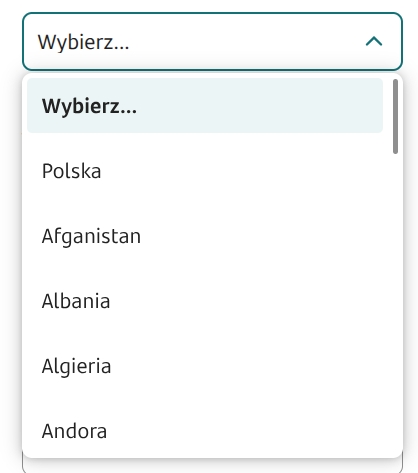
Figure 1. The list of values available after connecting the dictionary with the list of countries.
{% hint style="warning" %}
Values in the dictionary will always be displayed in the order in which they are in the source feeding it.
{% endhint %}
## Example fields with an additional description
In Combobox components, under External data source, you can connect scripts that return other values for the field in addition to the key (id) and label, e.g. description. For the description to be visible, in addition to supplying the parameter, you must also set the Additional description position (Styling). For example, the Combobox field can be supplied by a script with basic output parameters for the field id (cardId) and field name (cardName) and with the Additional field position set to BOTTOM (Styling).
Example implementation of a feeding script with additional output parameters for the field description (cardDesc) and the field icon (cardIcon):
{% code title="demoComboboxWithIconScript.js" expandable="true" %}
```js
function callService(context) {
const result = [
{
'cardOrder': "1",
'cardId': "icon1",
'cardIcon': "BB014_ic_radio_button.d91bc285933ad3ab.svg",
'cardName': "Card 1",
'cardDesc': "*2321 (Jan Kowalski)"
},
{
'cardOrder': "2",
'cardId': "icon2",
'cardIcon': "BB013_ic_check_box.b1a7fe0d7d753cf4.svg",
'cardName': "Card 2",
'cardDesc': "*4978 (Janusz Nowak)"
},
{
'cardOrder': "3",
'cardId': "icon3",
'cardIcon': "AC148_ic_ZUS_document_add.1b6eb10c6160e0b2.svg",
'cardName': "Card 3",
'cardDesc': "*1417 (Gerwazy Torpeda)"
}
]
return result;
}
```
{% endcode %}
Figure 2. Example of connecting outputs in a script-powered component
Figure 3. Example of connecting outputs in a script-powered component
{% hint style="info" %}
Demo request: demoCombobox
{% endhint %}
{% hint style="info" %}
♿WCAG: [Good WCAG practices for low-code dev](/documentation/documentation-en/budowanie-aplikacji/proces-biznesowy/tworzenie-procesu-biznesowego-w-bpmn-2.0/dobre-praktyki.md)
{% endhint %}
---
# Agent Instructions
This documentation is published with GitBook. GitBook is the documentation platform designed so that both humans and AI agents can read, navigate, and reason over technical content effectively. Learn more at gitbook.com.
## Querying This Documentation
If you need additional information that is not directly available in this page, you can query the documentation dynamically by asking a question.
Perform an HTTP GET request on the current page URL with the `ask` query parameter, and the optional `goal` query parameter:
```
GET https://docs.eximee.com/documentation/documentation-en/budowanie-aplikacji/interfejs-uzytkownika/formularze/biblioteka-komponentow-bazowych/2-pola-wyboru/pole-wyboru-wartosci-z-listy-combobox.md?ask=&goal=
```
`ask` is the immediate question: it should be specific, self-contained, and written in natural language.
`goal` is optional and describes the broader end goal you are ultimately trying to accomplish on behalf of the user. GitBook uses it to tailor the answer towards what is most useful for that goal.
The response will contain a direct answer to the question and relevant excerpts and sources from the documentation.
Use this mechanism when the answer is not explicitly present in the current page, you need clarification or additional context, or you want to retrieve related documentation sections.