> For the complete documentation index, see [llms.txt](https://docs.eximee.com/llms.txt). Markdown versions of documentation pages are available by appending `.md` to page URLs; this page is available as [Markdown](https://docs.eximee.com/documentation/documentation-en/budowanie-aplikacji/interfejs-uzytkownika/formularze/biblioteka-komponentow-bazowych/2-pola-wyboru/kafel-tile/grupa-kafli-tilegroup.md).
# Tile group - TileGroup
{% hint style="info" %}
Availability of the functionality depends on the license and may not be available in all deployments.
{% endhint %}
A single-choice group whose graphical representation of the option is a tile

## Component properties
| Eximee Designer property | Attribute name in the Source | Description |
| ------------------------------------------------------------------------------ | ---------------------------- | -------------------------------------------------------------------------------------------------------------------------------------------------------------- |
|
Label (section Basic properties)
| label | Label for the component. |
|
Number of columns (section Layout)
| columns | Number of columns in the component - the value is taken into account only when the component domain is fed by **External Data Source** (External Data Source). |
| Field description (section **Basic properties**) | description | Additional description for the tile group (displayed under the tiles) |
> More information about the component properties: [Common component properties](/documentation/documentation-en/budowanie-aplikacji/interfejs-uzytkownika/formularze/praca-z-komponentami-bazowymi/wspolne-wlasciwosci-komponentow.md)
## Component value
The component value is set to the value of the field selected by the user **Tile** ([Tile - Tile](/documentation/documentation-en/budowanie-aplikacji/interfejs-uzytkownika/formularze/biblioteka-komponentow-bazowych/2-pola-wyboru/kafel-tile.md)). No selection means that the property **value** of the component is an empty text.
## Internal components
Inside the component **Tile Group** one type of component can be embedded - **Tile** (component description in [Tile - Tile](/documentation/documentation-en/budowanie-aplikacji/interfejs-uzytkownika/formularze/biblioteka-komponentow-bazowych/2-pola-wyboru/kafel-tile.md)). The way components are arranged inside **Tile Groups** can be specified using the field **Number of columns** available in the section **Layout**.
## Component input parameters
| Parameter | Description |
| ----------- | ---------------------------------------------------------------------------------------------------------------------------------------------------------------------------------------------------- |
| **id** | The value taken by the selected tile (required field). An empty value returned by the service will cause a system error. |
| **content** | The tile content saved in HTML (scripts inside this HTML are not supported by the platform). |
| **title** | Tile title. |
| **value** | The value the group will take after the domain is populated (optional field). If a value outside the domain is returned, the default value will be set (if it is in the new domain) or an empty one. |
## Clearing the selection
To clear the current selection, set an empty value for the component (**value**), where an empty value means an empty text: "". It should also be noted that resetting the selection does not mean restoring the default value, but deselecting the currently selected Tile.
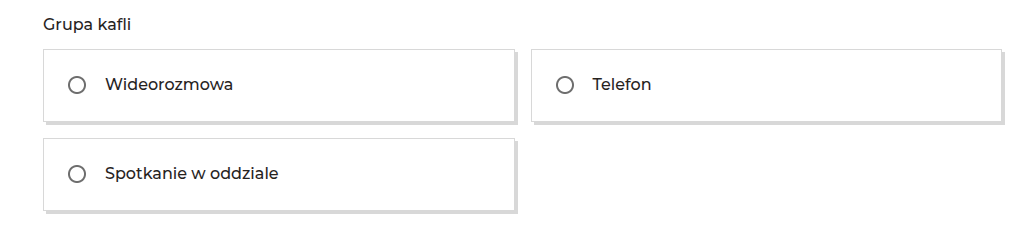
Figure 1. Example appearance of the component in the application
Figure 2. Example appearance of the component with tiles containing a label and contextual help
## Example of populating the Tile Group from a script
To dynamically generate selectable options (tiles), the Tile Group component can be populated by a script using **External Data Sources**.
The example below returns an array of three tiles with the choice of a bank contact method.
```js
function callService(context) {
const videoContent = "Video call";
const phoneContent = "Phone";
const branchContent = "Meeting at the branch";
return [
{ id: "wideorozmowa", content: videoContent, columns: 2 },
{ id: "telefon", content: phoneContent, columns: 2 },
{ id: "spotkanie", content: branchContent, columns: 2 },
];
}
```
After setting the above script as the data source for the component, go to the mapping configuration in the tab **Output parameters**. Then assign the fields returned by the script to the internal parameters **Tile Groups**:
* id - mapping to id from the script; this is the unique identifier of the selected option (the value that will be saved in the application after clicking the tile),
* content - mapping to content from the script; this value allows HTML code to be injected, which will format the description on the tile,
* columns - mapping to columns from the script; specifies the number of columns in the component.
Figure 3. Example of a Tile Group populated by a script
{% hint style="info" %}
Demo applications: demoTileGroup
{% endhint %}
{% hint style="info" %}
♿WCAG: [WCAG best practices for low-code dev](https://github.com/Consdata/eximee-docs/tree/main/budowanie-aplikacji/interfejs-uzytkownika/formularze/biblioteka-komponentow-bazowych/proces-biznesowy/tworzenie-procesu-biznesowego-w-bpmn-2.0/dobre-praktyki.md)
{% endhint %}
---
# Agent Instructions
This documentation is published with GitBook. GitBook is the documentation platform designed so that both humans and AI agents can read, navigate, and reason over technical content effectively. Learn more at gitbook.com.
## Querying This Documentation
If you need additional information that is not directly available in this page, you can query the documentation dynamically by asking a question.
Perform an HTTP GET request on the current page URL with the `ask` query parameter, and the optional `goal` query parameter:
```
GET https://docs.eximee.com/documentation/documentation-en/budowanie-aplikacji/interfejs-uzytkownika/formularze/biblioteka-komponentow-bazowych/2-pola-wyboru/kafel-tile/grupa-kafli-tilegroup.md?ask=&goal=
```
`ask` is the immediate question: it should be specific, self-contained, and written in natural language.
`goal` is optional and describes the broader end goal you are ultimately trying to accomplish on behalf of the user. GitBook uses it to tailor the answer towards what is most useful for that goal.
The response will contain a direct answer to the question and relevant excerpts and sources from the documentation.
Use this mechanism when the answer is not explicitly present in the current page, you need clarification or additional context, or you want to retrieve related documentation sections.