> For the complete documentation index, see [llms.txt](https://docs.eximee.com/llms.txt). Markdown versions of documentation pages are available by appending `.md` to page URLs; this page is available as [Markdown](https://docs.eximee.com/documentation/documentation-en/budowanie-aplikacji/interfejs-uzytkownika/formularze/biblioteka-komponentow-bazowych/2-pola-wyboru/checkbox/grupa-checkbox-checkboxgroup.md).
# Checkbox group - CheckboxGroup
{% hint style="info" %}
Availability of functionality depends on the license and may not be available in all deployments.
{% endhint %}
Checkbox Group component powered by a dictionary or service.

## Component properties
| Eximee Designer property | Attribute name in the Source | Description |
| ------------------------------------------------------------------------------ | --------------------------------- | ---------------------------------------------------------------------------------------------------------------------------------------------------------------------------------------------------------------------------------------------------------------------------------------------------------------- |
|
Number of columns (section Layout)
| columns | The number of columns into which the checkboxes should be distributed (default empty, meaning one column). The value should be chosen with the component's readability in mind. Too many columns may cause the content, descriptions, icons, or links associated with the checkboxes to be displayed unreadably. |
| Whether to mark the change in the summary (section **Other**) | changedByUserSummaryInfoCondition | Determines whether a change in the component's value should be marked in the Application Summary component (FormSummary). This property applies only in forms that use the Application Summary component. |
> More information about component properties: [Common component properties](/documentation/documentation-en/budowanie-aplikacji/interfejs-uzytkownika/formularze/praca-z-komponentami-bazowymi/wspolne-wlasciwosci-komponentow.md)
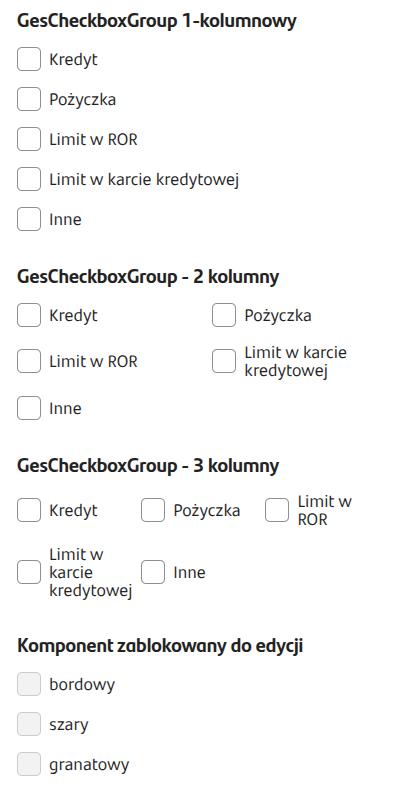
Figure 1. Example appearance of the component in the request.
## Checkbox arrangement in columns
When a larger number of columns is set, the checkboxes are arranged sequentially in rows, from left to right.
For example, for 6 items and 3 columns, the layout will be as follows:
```
1 2 3
4 5 6
```
An example of arranging checkboxes powered by the same data source - for one, two, and three columns - is shown in Figure 1.
## Dictionary as a data source
The component can receive data from a dictionary. It is enough to connect a previously created dictionary in the field **EXTERNAL DATA SOURCE**.
## Script as a data source
In CheckboxGroup components in **EXTERNAL DATA SOURCE** (External Data Source), scripts can be connected that, apart from the **Id**, return different values depending on the selected input options. This allows defining the content of the displayed checkboxes in the group according to our needs and the dependencies introduced at the input in a dynamic way.\
We can define the display of a checkbox with an icon, description, additional description, a link that opens a popup, popup title, popup content, the number of checkboxes displayed, and their selection.
Example implementation of a feeding script returning defined field descriptions and icons depending on the selected input options:
{% code title="demo-checkbox-group-items-with-popup.js" expandable="true" %}
```javascript
function callService(context) {
const isNullOrFalse = v => v === false || v === 'false' || v == null;
const withoutDescription = context.getFirstParameter("withoutDescription");
const withoutIconUrl = context.getFirstParameter("withoutIconUrl");
const withoutPopupLinkText = context.getFirstParameter("withoutPopupLinkText");
const withoutPopupContentHtml = context.getFirstParameter("withoutPopupContentHtml");
const withoutPopupTitle = context.getFirstParameter("withoutPopupTitle");
const withCount = +context.getFirstParameter("withCount") || 3;
const items = [];
for (let idx = 1; idx <= withCount; ++idx) {
items.push({
id: 'checkbox' + idx,
text: 'Option ' + idx,
description: isNullOrFalse(withoutDescription) ? 'Field description ' + idx : null,
iconUrl: isNullOrFalse(withoutIconUrl) ? 'assets/icons_3d/CA019_ic3d_wallet.png' : null,
popupLinkText: isNullOrFalse(withoutPopupLinkText) ? 'More' : null,
popupContentHtml: isNullOrFalse(withoutPopupContentHtml) ? 'Formatted textfrom the service in the popup.' : null,
popupTitle: isNullOrFalse(withoutPopupTitle) ? 'Sample content' : null
});
}
return items;
}
```
{% endcode %}
Figure 2. Example of connecting outputs in a component powered by a script.
{% hint style="info" %}
Demo application: demoGesCheckboxGroup
{% endhint %}
---
# Agent Instructions
This documentation is published with GitBook. GitBook is the documentation platform designed so that both humans and AI agents can read, navigate, and reason over technical content effectively. Learn more at gitbook.com.
## Querying This Documentation
If you need additional information that is not directly available in this page, you can query the documentation dynamically by asking a question.
Perform an HTTP GET request on the current page URL with the `ask` query parameter, and the optional `goal` query parameter:
```
GET https://docs.eximee.com/documentation/documentation-en/budowanie-aplikacji/interfejs-uzytkownika/formularze/biblioteka-komponentow-bazowych/2-pola-wyboru/checkbox/grupa-checkbox-checkboxgroup.md?ask=&goal=
```
`ask` is the immediate question: it should be specific, self-contained, and written in natural language.
`goal` is optional and describes the broader end goal you are ultimately trying to accomplish on behalf of the user. GitBook uses it to tailor the answer towards what is most useful for that goal.
The response will contain a direct answer to the question and relevant excerpts and sources from the documentation.
Use this mechanism when the answer is not explicitly present in the current page, you need clarification or additional context, or you want to retrieve related documentation sections.