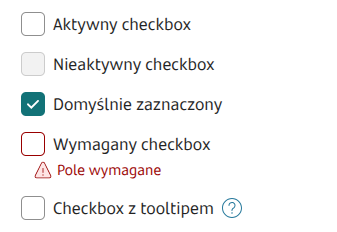
> For the complete documentation index, see [llms.txt](https://docs.eximee.com/llms.txt). Markdown versions of documentation pages are available by appending `.md` to page URLs; this page is available as [Markdown](https://docs.eximee.com/documentation/documentation-en/budowanie-aplikacji/interfejs-uzytkownika/formularze/biblioteka-komponentow-bazowych/2-pola-wyboru/checkbox.md).
# Checkbox
Checkbox

✅ **When to use:**
* It is possible to select more than one option.
:x: **When not to use:**
* Only one choice should be selected from several options. **Use**: [Radio](/documentation/documentation-en/budowanie-aplikacji/interfejs-uzytkownika/formularze/biblioteka-komponentow-bazowych/2-pola-wyboru/radio.md).
## Component properties
| Eximee Designer property | Attribute name in the Source | Description |
| ------------------------------------------ | ---------------------------- | -------------------------------------------------------------------------------------------------------------------------------------------------------------------------------------------------------------------------------------------------------------------------------------------------------------------------------------------------------------- |
| **Checkbox checked** (section **Other**) | checked | Specifies whether the field should be checked by default (initially set to "false"). Equivalent to the default value for other fields. |
| **Checked value** (section **Other**) | valueYes | The value the checkbox takes when it is checked - by default, if no other value is set, "true" is returned. |
| **Unchecked value** (section **Other**) | valueNo | The value the checkbox takes when it is unchecked - by default, if no other value is set, "false" is returned. |
| **Checkbox setting** (section **Other**) | tickPosition |
Availability of the functionality depends on the license and may not be available in all deployments.
By default empty (set to DEFAULT), positions the checkbox in the middle of the component in vertical orientation. Set to TOP positions the checkbox at the top of the component in vertical orientation.
|
| **Content** (section **Basic properties**) | text | Text displayed with the component. It is possible to reference variables or fields, e.g.: ${sessionVariable1} or ${GesTextField1} |
| **Description** (section **Other**) | description |
Availability of the functionality depends on the license and may not be available in all deployments.
Defines the business description of the field - the display method depends on the specific implementation of the component.
|
> More information about component properties: [Common component properties](/documentation/documentation-en/budowanie-aplikacji/interfejs-uzytkownika/formularze/praca-z-komponentami-bazowymi/wspolne-wlasciwosci-komponentow.md)
## Populating the checkbox text with different content
If the text next to the checkbox should depend on a condition and display different (or formatted) content, it can be populated with content from the TextContent component. To do this, you need to connect on the checkbox in the field **External data source** service *TextContentService*, in which, as the input parameter component, we provide the artifact containing the text to be displayed. In the output parameters for the attribute **text** and **value** we select the output parameter **artifact**.
The button leading to detailed information can be placed inside the Content (TextContent) by placing the tag `
\
`.
Content defined in **moreInfoLabel** can be defined dynamically (for example, populated from a Text Field or another component placed on the form).
## Component state information
Information about the current value of a given component property, which can then be used on the form, e.g. to populate another field with the value of that property, can be obtained using the construct COMPONENT\_ID$PROPERTY\_NAME
For a checkbox, the following properties can be retrieved:
| Key | Description |
| ------------------------- | --------------------------------------------------------------------------------- |
| **moreInfoButtonClicked** | true - if the link leading to detailed information has been clicked at least once |
{% hint style="info" %}
Example: populating the property **Data source from another field** (valueSourceId) via GesCheckbox1$moreInfoButtonClicked returns a true/false value indicating whether the checkbox has been checked.
{% endhint %}
### Available events
| Name | Description |
| ----------- | -------------------------------------------- |
| **CHECK** | Event emitted when the checkbox is checked |
| **UNCHECK** | Event emitted when the checkbox is unchecked |
### Available actions
Action documentation: [Actions](/documentation/documentation-en/budowanie-aplikacji/logika-biznesowa/przeplywy/akcje.md)
| Name | Description |
| ----------- | ----------------------------------------------------------------------------------------------------- |
| **CHECK** | Checking the checkbox. **NOTE**: does not emit the CHECK event |
| **UNCHECK** | Unchecking the checkbox. **NOTE**: does not emit the UNCHECK event |
| **TOGGLE** | Changing the checkbox value to the opposite one. **NOTE**: does not emit the CHECK and UNCHECK events |
Figure 1.Example of the checkbox position set to TOP and default (DEFAULT)
Figure 2. Example appearance of the component on the form.
Figure 3. Example appearance of the component on the form in switch presentation.
{% hint style="info" %}
Demo forms: demoCheckbox, demoPopup
{% endhint %}
{% hint style="info" %}
♿WCAG: [Good WCAG practices for low-code dev](/documentation/documentation-en/budowanie-aplikacji/proces-biznesowy/tworzenie-procesu-biznesowego-w-bpmn-2.0/dobre-praktyki.md)
{% endhint %}
---
# Agent Instructions
This documentation is published with GitBook. GitBook is the documentation platform designed so that both humans and AI agents can read, navigate, and reason over technical content effectively. Learn more at gitbook.com.
## Querying This Documentation
If you need additional information that is not directly available in this page, you can query the documentation dynamically by asking a question.
Perform an HTTP GET request on the current page URL with the `ask` query parameter, and the optional `goal` query parameter:
```
GET https://docs.eximee.com/documentation/documentation-en/budowanie-aplikacji/interfejs-uzytkownika/formularze/biblioteka-komponentow-bazowych/2-pola-wyboru/checkbox.md?ask=&goal=
```
`ask` is the immediate question: it should be specific, self-contained, and written in natural language.
`goal` is optional and describes the broader end goal you are ultimately trying to accomplish on behalf of the user. GitBook uses it to tailor the answer towards what is most useful for that goal.
The response will contain a direct answer to the question and relevant excerpts and sources from the documentation.
Use this mechanism when the answer is not explicitly present in the current page, you need clarification or additional context, or you want to retrieve related documentation sections.