# Text field - TextField

Single-line text input field.

![](https://content.gitbook.com/content/2CssJT0zIo4SJQLbSZ6l/blobs/dGysplFFfZmZvft7owVl/2_files/image2025-5-14_14-11-46.png)

✅ **When to use:**

* The data fits in one line (e.g. first name, last name, PESEL).

:x: **When not to use:**

* It is possible to enter more than one sentence (e.g. opinion, justification). **Use**: [TextArea](https://docs.eximee.com/documentation/documentation-en/budowanie-aplikacji/interfejs-uzytkownika/formularze/biblioteka-komponentow-bazowych/1-wprowadzanie-danych-inputs/obszar-tekstu-textarea).
* It is possible and sensible to use a dedicated field (e.g. PIN, phone number, date). **Use**: [PinField](https://docs.eximee.com/documentation/documentation-en/budowanie-aplikacji/interfejs-uzytkownika/formularze/biblioteka-komponentow-bazowych/1-wprowadzanie-danych-inputs/komponent-pin-pinfield), [PhoneInput](https://docs.eximee.com/documentation/documentation-en/budowanie-aplikacji/interfejs-uzytkownika/formularze/biblioteka-komponentow-bazowych/1-wprowadzanie-danych-inputs/numer-telefonu-phoneinput), [DatePicker](https://docs.eximee.com/documentation/documentation-en/budowanie-aplikacji/interfejs-uzytkownika/formularze/biblioteka-komponentow-bazowych/1-wprowadzanie-danych-inputs/data-datepicker).

## Component properties

| Eximee Designer property                                                           | Attribute name in the Source      | Description                                                                                                                                                                                                                                                                                                                                                                                                                                                                                                                                                                                                                                                                                                                                                                                                                                |
| ---------------------------------------------------------------------------------- | --------------------------------- | ------------------------------------------------------------------------------------------------------------------------------------------------------------------------------------------------------------------------------------------------------------------------------------------------------------------------------------------------------------------------------------------------------------------------------------------------------------------------------------------------------------------------------------------------------------------------------------------------------------------------------------------------------------------------------------------------------------------------------------------------------------------------------------------------------------------------------------------ |
| **Inactive field displayed as a label** (section **Basic properties**)             | labelIfDisabled                   | <p>Set to true means that the disabled component is displayed as bold text, without greying out, borders, or background (on the application it looks like a Label). → demo application: demoLabelIfDisabled</p><p>Availability of the functionality depends on the license and may not be available in all deployments.</p>                                                                                                                                                                                                                                                                                                                                                                                                                                                                                                                |
| **Data type** (section **Data quality**)                                           | expectedType                      | Specifies the type of entered data (available formats are: STRING, LONG, DOUBLE, URL, EMAIL.) in order to force the mobile channel to display a keyboard appropriate for this type (e.g. to display only the numeric keyboard, use the LONG type).                                                                                                                                                                                                                                                                                                                                                                                                                                                                                                                                                                                         |
| **Real-time formatting** (section **Data quality**)                                | formatterRealTime                 | Specifies whether formatting should occur after pressing a key on the keyboard, or only after leaving the field. Default value: "false".                                                                                                                                                                                                                                                                                                                                                                                                                                                                                                                                                                                                                                                                                                   |
| **Validation after each character** (section **Data quality**)                     | validationOnEverySign             | Allows validation to be triggered on the component after each entered character (only field requiredness and mask). Default component value: 'false'. Availability of the functionality depends on the license and may not be available in all deployments.                                                                                                                                                                                                                                                                                                                                                                                                                                                                                                                                                                                |
| **Character counter** (section **Data quality**)                                   | characterCounter                  | If set to true, a counter showing how many characters have been entered should appear under the field. If the field also has set **Maximum number of characters**, then that information will also appear. Displaying validation errors hides the counter. Availability of the functionality depends on the license and may not be available in all deployments.                                                                                                                                                                                                                                                                                                                                                                                                                                                                           |
| **Autocomplete for empty field** (section **Data quality**)                        | autocompleteForEmptyField         | Allows suggestions to be displayed as soon as the text field is entered. Allows selecting one of the options or entering the choice manually. For a text field that should display suggestions, check the checkbox **Autocomplete for empty field** from the section **Data quality**. Connect an external data source, as described below in the section **Autocomplete - supplying suggestions.**                                                                                                                                                                                                                                                                                                                                                                                                                                        |
| **Minimum number of characters triggering suggestions** (section **Data quality**) | minLengthToAutocomplete           | <p>Minimum number of characters for which the mechanism triggering suggestions (autocompleter) will be launched. Value 0 means no such mechanism.<br><br>For the functionality to work properly, the flag <strong>autoServerUpdate</strong> must be set to "false". Availability of the functionality depends on the license and may not be available in all deployments.</p>                                                                                                                                                                                                                                                                                                                                                                                                                                                              |
| **Additional option in the list (key)** (section **Data quality**)                 | autocompleteNoMatchButtonLabelKey | Translation key whose value is displayed in the additional button shown in the autocomplete suggestions list, which allows the client to indicate that they have not found a suitable option in the domain. Clicking the button emits the AUTOCOMPLETE\_NO\_MATCH\_BUTTON\_CLICKED action. Control of button visibility is described below in the section **Autocomplete - supplying suggestions**property. Availability of the functionality depends on the license and may not be available in all implementations.                                                                                                                                                                                                                                                                                                                      |
| **Filter the suggestions list** (section **Data quality**)                         | autocompleteOptionsFilterEnabled  | Flag defining whether, when the autocomplete suggestions list is supplied from a service (EDS), it should be platform-filtered based on the text entered in the field. Setting it to false allows the entire case-specific suggestion logic to be included in the service. When set to false, the value entered by the client is automatically passed to the service supplying the suggestions as a parameter with the key `__searchText` (even if we do not define this input parameter for the supplying service), which can be used in the service to implement custom filtering logic. Default value: true. Availability of the functionality depends on the license and may not be available in all deployments.                                                                                                                      |
| **Show clear field button** (section **Styling**)                                  | showClearButton                   | <p>Flag indicating whether the component should display a button used to clear the field. Default value: false.</p><p>Availability of the functionality depends on the license and may not be available in all deployments.</p>                                                                                                                                                                                                                                                                                                                                                                                                                                                                                                                                                                                                            |
| **Maximum number of characters** (section **Data quality**)                        | maxLength                         | Specifies the maximum number of characters.                                                                                                                                                                                                                                                                                                                                                                                                                                                                                                                                                                                                                                                                                                                                                                                                |
| **Mask** (section **Data quality**)                                                | mask                              | Mask *REGEX* validating the field. More in [Simple validations](https://docs.eximee.com/documentation/documentation-en/budowanie-aplikacji/interfejs-uzytkownika/formularze/praca-z-komponentami-bazowymi/walidacja-wartosci-komponentow/walidacje-proste-wbudowane).                                                                                                                                                                                                                                                                                                                                                                                                                                                                                                                                                                      |
| **Mask matching error message** (section **Data quality**)                         | maskValidationError               | Error label in case of a value that does not match the mask.                                                                                                                                                                                                                                                                                                                                                                                                                                                                                                                                                                                                                                                                                                                                                                               |
| **Mask display** (section **Data quality**)                                        | visibleMask                       | <p>Allows the template designer to define the format in which data should be entered into the text field. The mask allows defining specific field types using the following characters:</p><ul><li>S - letter (A-Z, a-z)</li><li>9 - numeric character</li><li>\* - alphanumeric character</li></ul><p>The mask can also include a desired separator, e.g. "-", "/". <strong>Example masks:</strong></p><ul><li>99/99/9999 - e.g. a date in the format 05/02/2013</li><li>99-99-99 - e.g. a date in the format 05-02-13</li><li>99-999 - e.g. postal code 61-123</li><li>SS999 - a string with two letters at the beginning and three digits at the end, e.g. CD123.</li></ul><p>More information here: <a href="../../praca-z-komponentami-bazowymi/walidacja-wartosci-komponentow/walidacje-proste-wbudowane">Simple validations</a></p> |
| **Prefix visibility condition** (section **Data quality**)                         | prefixVisibleCondition            | Determines whether and when to display the prefix. Availability of the functionality depends on the license and may not be available in all deployments.                                                                                                                                                                                                                                                                                                                                                                                                                                                                                                                                                                                                                                                                                   |
| **Prefix** (section **Data quality**)                                              | prefix                            | Text to be displayed in the prefix.                                                                                                                                                                                                                                                                                                                                                                                                                                                                                                                                                                                                                                                                                                                                                                                                        |
| **Suffix** (section **Data quality**)                                              | suffix                            | Text to be displayed in the suffix.                                                                                                                                                                                                                                                                                                                                                                                                                                                                                                                                                                                                                                                                                                                                                                                                        |
| **Placeholder** (section **Data quality**)                                         | placeholderText                   | Text displayed as the field placeholder, by default it is empty. Availability of the functionality depends on the license and may not be available in all deployments.                                                                                                                                                                                                                                                                                                                                                                                                                                                                                                                                                                                                                                                                     |
| **Formatter** (section **Data quality**)                                           | formatter                         | Name of the formatter used for the field.                                                                                                                                                                                                                                                                                                                                                                                                                                                                                                                                                                                                                                                                                                                                                                                                  |
| **Field description** (section **Data quality**)                                   | description                       | Text displayed as a description of the field below it; by default, this is an empty value. Availability of the functionality depends on the license and may not be available in all implementations.                                                                                                                                                                                                                                                                                                                                                                                                                                                                                                                                                                                                                                       |
| **Sensitive data mask** (section **Security**)                                     | sensitiveDataMask                 | Specifies the type of mask used for entered values, e.g. sensitive data (available types are: NO\_MASK, PESEL, ID\_NUMBER, CELL\_PHONE\_NUMBER, PHONE\_NUMBER). The default type is NO\_MASK, for which no masking of sensitive data is applied. Only the value coming from the **Data source from another field**. Usage examples: [Sensitive data mask](https://docs.eximee.com/documentation/documentation-en/budowanie-aplikacji/interfejs-uzytkownika/formularze/praca-z-komponentami-bazowymi/walidacja-wartosci-komponentow/maska-danych-sensytywnych) Availability of the functionality depends on the license and may not be available in all deployments.                                                                                                                                                                        |
| **Disallowing invalid suggestion characters** (section **Security**)               | forbidIllegalValues               | Default value "false".                                                                                                                                                                                                                                                                                                                                                                                                                                                                                                                                                                                                                                                                                                                                                                                                                     |
| **Pasting enabled** (section **Security**)                                         | pasteEnabledCondition             | Conditional pasting into the field (if we set the field value to "false", it will not be possible to paste values from the clipboard into the field).                                                                                                                                                                                                                                                                                                                                                                                                                                                                                                                                                                                                                                                                                      |
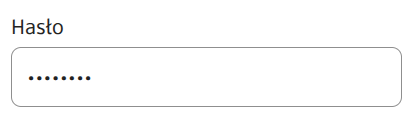
| **Password** (section **Security**)                                                | password                          | Set to "true" means that dots will be shown in the field instead of entered characters (i.e. the entered password will not be visible). Default value "false".                                                                                                                                                                                                                                                                                                                                                                                                                                                                                                                                                                                                                                                                             |
| **Icon** (section **Styling**)                                                     | iconUrl                           | <p>Availability of the functionality depends on the license and may not be available in all deployments. Allows displaying an icon in the text field. Provide the icon address as a URL or a file path. Accepted file formats: png, jpg, svg.</p><ul><li>If the option <strong>Inactive field displayed as a label</strong>has been selected, the defined <strong>Prefix</strong> or <strong>Autocomplete</strong> has been enabled, then the icon will not be displayed.</li></ul>                                                                                                                                                                                                                                                                                                                                                        |

> More information about component properties: [Common component properties](https://docs.eximee.com/documentation/documentation-en/budowanie-aplikacji/interfejs-uzytkownika/formularze/praca-z-komponentami-bazowymi/wspolne-wlasciwosci-komponentow)

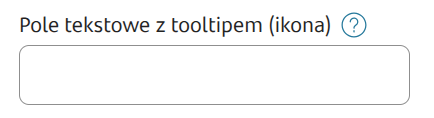
<figure><img src="https://content.gitbook.com/content/2CssJT0zIo4SJQLbSZ6l/blobs/OfTabdhoJOmzoRDD4ZYj/2_files/image2025-5-15_8-49-39.png" alt=""><figcaption><p><em><strong>Figure 1.</strong> Example appearance of the component with contextual help.</em></p></figcaption></figure>

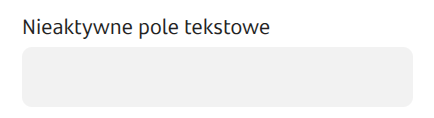
<figure><img src="https://content.gitbook.com/content/2CssJT0zIo4SJQLbSZ6l/blobs/ypqViGBUl5xzNHtGsRAp/2_files/image2025-5-15_8-50-38.png" alt=""><figcaption><p><em><strong>Figure 2.</strong> Example appearance of the disabled component in the application.</em></p></figcaption></figure>

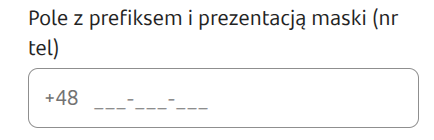
<figure><img src="https://content.gitbook.com/content/2CssJT0zIo4SJQLbSZ6l/blobs/iCsTJz6K1mLEMCsJNyXV/2_files/image2025-5-15_8-51-39.png" alt=""><figcaption><p><em><strong>Figure 3.</strong> Example appearance of the component with prefix and mask display.</em></p></figcaption></figure>

<figure><img src="https://content.gitbook.com/content/2CssJT0zIo4SJQLbSZ6l/blobs/0R43O6FF1CtR8aU0lDSR/2_files/image2025-5-15_8-53-27.png" alt=""><figcaption><p><em><strong>Figure 4.</strong> Example appearance of the component with the Password option.</em></p></figcaption></figure>

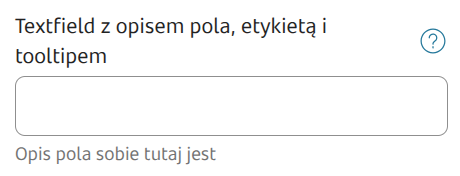
<figure><img src="https://content.gitbook.com/content/2CssJT0zIo4SJQLbSZ6l/blobs/aZZcVNLMdWBDXotV7KEs/2_files/image2025-5-15_9-2-5.png" alt=""><figcaption><p><em><strong>Figure 5.</strong> Example appearance of the component with field description, placeholder, and character counter.</em></p></figcaption></figure>

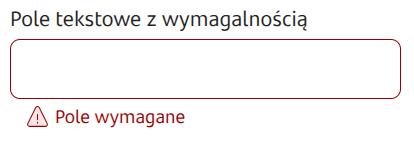
<figure><img src="https://content.gitbook.com/content/2CssJT0zIo4SJQLbSZ6l/blobs/V0PbhtzMwcBc2ugtUfTz/2_files/image2025-5-15_9-4-54.png" alt=""><figcaption><p><em><strong>Figure 6.</strong> Example appearance of the component with requiredness set.</em></p></figcaption></figure>

<figure><img src="https://content.gitbook.com/content/2CssJT0zIo4SJQLbSZ6l/blobs/PNfQxfp4J0eGZnNhlGrI/2_files/image2024-4-9_15-55-54.png" alt=""><figcaption><p><em><strong>Figure 7.</strong> Example appearance of the component with an icon.</em></p></figcaption></figure>

***

## Autocomplete - supplying suggestions

To supply the component with autocomplete enabled with a list of suggestions, you need to connect an External Data Source (EDS) to it, which can be a dictionary or a service.

## **Service supply**

### **Input parameters**

When supplying suggestions from a service, this service can receive information about the value entered in the field or a value from another field. This value can be passed as a service input parameter with the key `__searchText` and used in the script. Therefore, in order to filter the search domain with the value entered in the text field, you must define in ServiceProxy an input parameter named `__searchText` (the name starts with two underscores). This parameter does not need to be connected in any way in the control from Eximee Designer.

### **Output parameters**

The service output should be connected to the appropriate component parameters.

| Attribute name in the Source  | Description                                                                                                                                                                                                                                                                         |
| ----------------------------- | ----------------------------------------------------------------------------------------------------------------------------------------------------------------------------------------------------------------------------------------------------------------------------------- |
| autocompleteValue             | Subsequent values to display in the suggestions list.                                                                                                                                                                                                                               |
| showAutocompleteNoMatchButton | Optional flag indicating whether to display an additional button in the suggestions list (described by the autocompleteNoMatchButtonLabelKey property). Default value: false. Availability of the functionality depends on the license and may not be available in all deployments. |
| descriptionText               | Additional value displayed together with autocompleteValue.                                                                                                                                                                                                                         |

***

{% hint style="info" %}
Demo application: demoTextComponents and demoText

Demo application in selected deployments: textFieldIcon
{% endhint %}

{% hint style="info" %}
♿WCAG: [WCAG best practices for low-code dev](https://docs.eximee.com/documentation/documentation-en/budowanie-aplikacji/proces-biznesowy/tworzenie-procesu-biznesowego-w-bpmn-2.0/dobre-praktyki)
{% endhint %}