# Phone number - PhoneInput

{% hint style="info" %}
Availability of the functionality depends on the license and may not be available in all deployments.
{% endhint %}

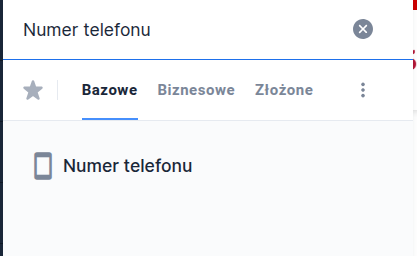
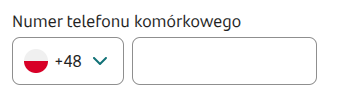
The phone number is a text component that allows entering a phone number and country prefix. After filling in the prefix, in some implementations information about the country to which the number is assigned is displayed. The number of characters allowed in the phone number field is validated depending on the selected prefix.

<figure><img src="https://2112972046-files.gitbook.io/~/files/v0/b/gitbook-x-prod.appspot.com/o/spaces%2F2CssJT0zIo4SJQLbSZ6l%2Fuploads%2Fgit-blob-7e1884b5fdc8bcbddb141179ac626833d3d16c3b%2FphoneInput1.png?alt=media" alt=""><figcaption></figcaption></figure>

✅ **When to use:**

* The number should include the country prefix.

:x: **When not to use:**

* The phone number should not include a prefix, or greater flexibility is needed for the entered number. **Use**: [TextField](https://docs.eximee.com/documentation/documentation-en/budowanie-aplikacji/interfejs-uzytkownika/formularze/biblioteka-komponentow-bazowych/1-wprowadzanie-danych-inputs/numer-telefonu-phoneinput).

## Component properties

| Eximee Designer property                                               | Attribute name in the Source | Description                                                                                                                  |
| ---------------------------------------------------------------------- | ---------------------------- | ---------------------------------------------------------------------------------------------------------------------------- |
| **Inactive field displayed as a label** (section **Basic properties**) | labelIfDisabled              | Specifies whether the inactive field should be displayed as a label (default value "false").                                 |
| **Default prefix** (section **Data quality**)                          | defaultPrefix                | Default prefix value for the field.                                                                                          |
| **Mask matching error message** (section **Data quality**)             | maskValidationError          | Error label displayed when a value inconsistent with the defined mask is entered.                                            |
| **Mask** (section **Data quality**)                                    | mask                         | Regular expression mask (REGEX) validating the correctness of data in the field.                                             |
| **Invalid prefix** (section **Data quality**)                          | invalidPrefixValidatorError  | Error label displayed when the value does not match the prefix validation.                                                   |
| **Prefix label** (section **Data quality**)                            | prefixLabel                  | Allows defining a description (label) for the prefix.                                                                        |
| **Prefix editability condition (Source)**                              | prefixEnabledCondition       | Allows or blocks changing the prefix. To block changes, add the attribute `prefixEnabledCondition="js:false"` in the source. |

> More information about component properties: [Common component properties](https://docs.eximee.com/documentation/documentation-en/budowanie-aplikacji/interfejs-uzytkownika/formularze/praca-z-komponentami-bazowymi/wspolne-wlasciwosci-komponentow)

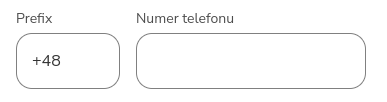
<figure><img src="https://content.gitbook.com/content/2CssJT0zIo4SJQLbSZ6l/blobs/7GNqwhGfijEfS8o7C21E/13k_files/image2025-5-16_15-1-5.png" alt=""><figcaption><p><em><strong>Figure 1.</strong> Example appearance of the component in the application.</em></p></figcaption></figure>

<figure><img src="https://2112972046-files.gitbook.io/~/files/v0/b/gitbook-x-prod.appspot.com/o/spaces%2F2CssJT0zIo4SJQLbSZ6l%2Fuploads%2Fc8zVdPnzdR0AExFWAab0%2Fobraz.png?alt=media&#x26;token=fd1f6a68-ff44-4077-99bd-2d68f6c10e29" alt=""><figcaption><p><em><strong>Figure 2.</strong> Example appearance of the component without country information</em></p></figcaption></figure>

## Retrieving the value from the component

The component value is a json:

```json
{"prefix":"48","phone":"614151000","phoneTouched":true,"prefixTouched":true,"phoneConfirmationState":"NONE"}
```

Example script returning a phone number (without prefix):

```js
// example GesPhoneInput value: {"prefix":"48","phone":"614151000","phoneTouched":true,"prefixTouched":true,"phoneConfirmationState":"NONE"}

function callService(context) {
    const rawPhoneData = context.getFirstParameter('GesPhoneInput');
    
    if (!rawPhoneData) {
        return [{ 'phoneNumber': null }];
    }

    try {
        const phoneState = JSON.parse(rawPhoneData); //parsing GesPhoneInput (JSON)
        const phoneNumber = phoneState.phone || null;
        
        return [{ 'phoneNumber': phoneNumber }];
    } catch (error) {
        return [{ 'phoneNumber': null }];
    }
}
```

Individual values can be retrieved on request using specific attributes available in the component via: `${componentId$attribute}`

Available attributes:

* GesPhoneInput1$**phone** - phone number
* GesPhoneInput1$**prefix** - prefix without plus
* GesPhoneInput1$**prefixWithPlus** - prefix with plus
* GesPhoneInput1$**fullPhone** - full number with plus

In the script, these attributes can be retrieved using getData, e.g. `getData("GesPhoneInput1","fullPhone")`

## Passing values to the component

### Passing as a data source from another field

Example JSON(String) object passed to the component:

```json
{"prefix":"48","phone":"614151000","phoneTouched":true,"prefixTouched":true,"phoneConfirmationState":"NONE"}
```

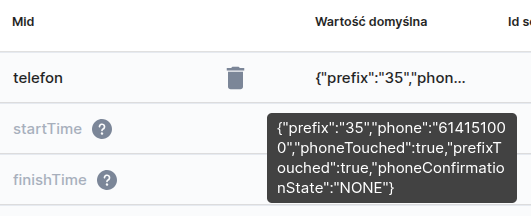
The object can be passed, for example, via a session variable and set in the attribute **Data source from another field**:

<figure><img src="https://2112972046-files.gitbook.io/~/files/v0/b/gitbook-x-prod.appspot.com/o/spaces%2F2CssJT0zIo4SJQLbSZ6l%2Fuploads%2Fgit-blob-ef4bcb4626e720e4bba7eddd76e769524f087a4f%2FphoneInput2.png?alt=media" alt=""><figcaption><p><em><strong>Figure 3.</strong> Setting the value as a session variable</em></p></figcaption></figure>

<figure><img src="https://2112972046-files.gitbook.io/~/files/v0/b/gitbook-x-prod.appspot.com/o/spaces%2F2CssJT0zIo4SJQLbSZ6l%2Fuploads%2Fgit-blob-760e5d3596aa51abdc7fd274ad241cc6ea836b3d%2FphoneInput4.png?alt=media" alt=""><figcaption><p><em><strong>Figure 4.</strong> Passing a session variable to the component</em></p></figcaption></figure>

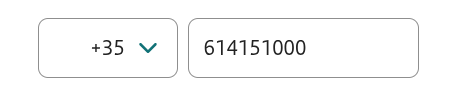
<figure><img src="https://2112972046-files.gitbook.io/~/files/v0/b/gitbook-x-prod.appspot.com/o/spaces%2F2CssJT0zIo4SJQLbSZ6l%2Fuploads%2Fgit-blob-134d2968b785e90f0742a4281f82fcadf94bca17%2FphoneInput3.png?alt=media" alt=""><figcaption><p><em><strong>Figure 5.</strong> Component with an example phone number and prefix value set</em></p></figcaption></figure>

### Feeding from an external data source (EDS)

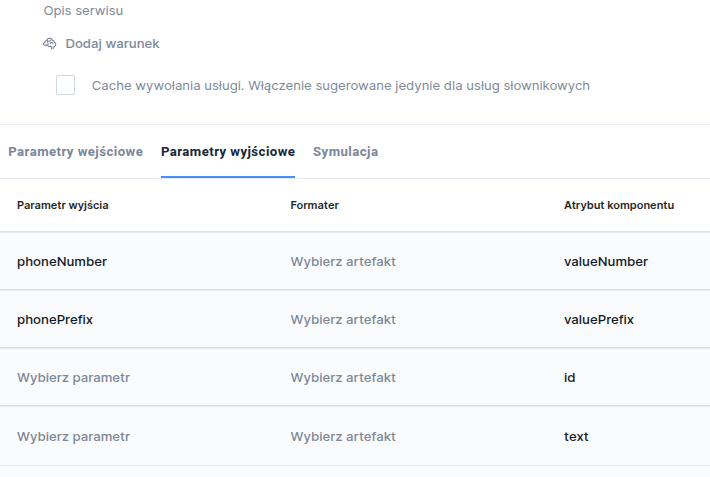
The component can also be fed via an External Data Source. Example EchoService script:

```js
function callService(context) {

    const phoneNumber = "614151000";
    const phonePrefix = "36";

    return [{ 
        "phoneNumber": phoneNumber,
        "phonePrefix": phonePrefix
    }];
}
```

<br>

<figure><img src="https://2112972046-files.gitbook.io/~/files/v0/b/gitbook-x-prod.appspot.com/o/spaces%2F2CssJT0zIo4SJQLbSZ6l%2Fuploads%2Fgit-blob-5dc76eeb75d0c990eabfa9d92fcf640eb425bfe5%2FphoneInput5.png?alt=media" alt=""><figcaption><p><em><strong>Figure 6.</strong> Mapping the script to the component</em></p></figcaption></figure>

{% hint style="info" %}
Demo request: demoPhoneInput
{% endhint %}