> For the complete documentation index, see [llms.txt](https://docs.eximee.com/llms.txt). Markdown versions of documentation pages are available by appending `.md` to page URLs; this page is available as [Markdown](https://docs.eximee.com/documentation/documentation-en/budowanie-aplikacji/aplikacja-biznesowa/zarzadzanie-aplikacja/eksport-import-aplikacji.md).
# Application export/import
{% hint style="info" %}
Availability of the application ownership functionality depends on the license and may not be available in all deployments.
{% endhint %}
Application export and import features allow transferring ready-made business solutions between different environments, e.g. from development to test or production.
## Application export
Exporting an application in Eximee Designer is used to save it as a file that contains all artifacts that make up the application - forms, processes, composite components, scripts, dictionaries, content, and other related elements.
Export is available after going to the **Applications** module and selecting an application from the list.\
The **Export artifact**  button is located in the bar in the upper-right corner of the screen and is available from any tab of the application's components.
After clicking the **Export artifact** button, a dialog box will open whose appearance and content will differ depending on whether this is the first or a subsequent application export.
After the export is performed, the system will generate a file with the .artifact extension and allow it to be saved locally.
The exported application **does not** contain ownership information.
### Application export with graphics
If the application has [application graphics](/documentation/documentation-en/budowanie-aplikacji/aplikacja-biznesowa/elementy-aplikacji-artefakty/grafiki-aplikacji.md), the export returns a `.artifact` file `.zip` with structure:
```
demo.zip
├── demo.artifact
└── graphics/
├── light/demo_logo.svg
└── dark/demo_logo.svg
```
Directory `graphics/dark` contains only graphics that have a separate dark variant. Each graphic is exported in the published version.
{% hint style="warning" %}
File `.artifact` from the package `.zip` does not contain graphics files. The entire file should always be imported `.zip`.
{% endhint %}
### First release
In the window of the first export, you should add a version description and review which artifacts, and in which version, will be included in the application. Clicking the **Release** button will open a system window allowing the artifact to be saved to disk (with the option to add a comment to the created version).

### Subsequent export
In the subsequent export window, you will receive information about the previous export (date and description), and the changes list will show the differences compared to the previous export, i.e. those artifacts that were added, changed, or removed. If there were no changes since the previous export, a message indicating that there is no data to display will appear in place of the changes list.

### Export history
The **Export history** button, located in the bar in the upper-right corner of the screen, allows you to display a dialog box with the history of all application exports along with the date, description, and information about the user who performed the export.

## Application import
Application import allows you to load a previously exported application file into Eximee Designer.
{% stepper %}
{% step %}
#### Importing an exported application — step 1
In the application list, click the button in the upper-right corner **Import application**:
Figure 4. The "Applications" tab with the import option
{% endstep %}
{% step %}
#### Importing an exported application — step 2
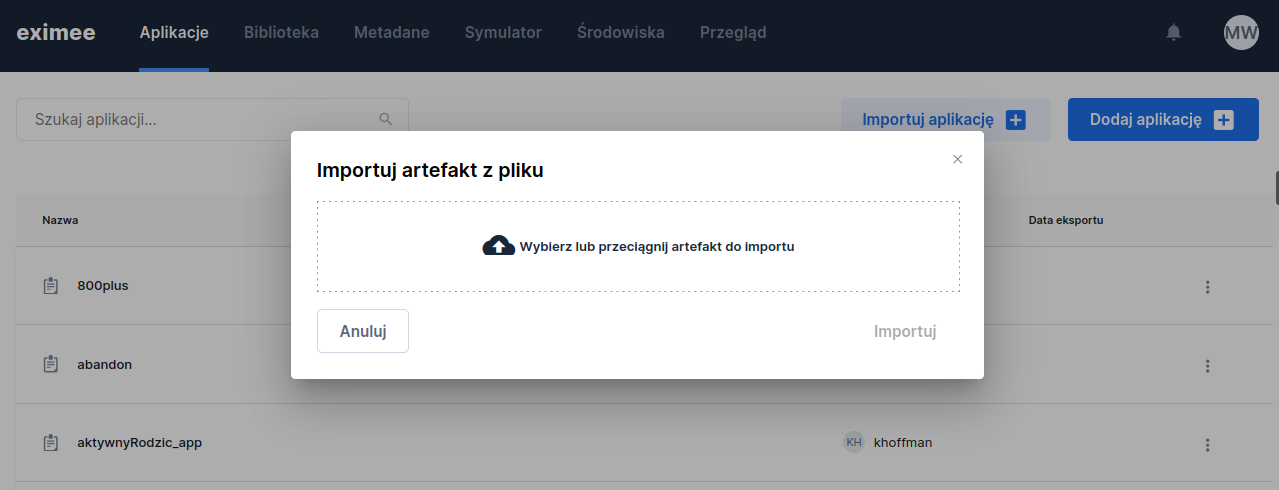
In the dialog box that opens, place the exported artifact (a file with the .artifact or .zip extension), and then click **Import**:
Figure 5. Application artifact import window
{% endstep %}
{% endstepper %}
After the import is complete, the system displays a message indicating success. If the artifact has been uploaded to the repository for the first time, a message confirming its successful import will appear. If there is already an artifact with the same name in the repository, the system will inform you that the selected version of the artifact already exists, but the import will still complete successfully.
{% hint style="info" %}
The import window is used to load into the repository any artifact previously downloaded from Eximee Designer - it does not have to be an application; it can be, for example, a form, a process, or a script.
Remember that the version of the artifact to be imported should be higher than the version of the same artifact already in the environment repository (more about versioning in: [Versioning](/documentation/documentation-en/budowanie-aplikacji/aplikacja-biznesowa/wersjonowanie.md)).
{% endhint %}
### Importing a .zip package
The package `.zip` always contains the file `.artifact`. The remaining content depends on whether the application has graphics:
* **Application with graphics** - the package must also contain the directory `graphics/` with files for all application graphics, as in the package created by export. If any file is missing, the import will be rejected.
* **Application or artifact without graphics** - the package may contain only the file `.artifact`. It will be imported in the same way as the file `.artifact` indicated directly.
During the import of an application with graphics, the system for each graphic:
* creates and publishes the graphic if it does not exist in the environment,
* creates and publishes a new version if the graphic exists in a different version,
* skips the graphic if the same version already exists in the environment.
If any graphic is rejected, nothing will be imported.
### Ownership verification rules during import
The application import process and its artifacts are subject to the following ownership checks:
1. **Application update:**\
When importing a version higher than the one currently in the environment, the user **must** belong to the owner group of the current application.
2. **New application:**\
If the application does not exist in the environment, anyone can perform the import, but the application will be imported **without an assigned owner**.
3. **Artifact import:**\
When importing an application with artifacts (forms, data models, and other objects) that are in a higher version than those currently in the environment, the importing user **must** must have ownership permissions for those specific artifacts within the application.
[Artifact Manager](/documentation/documentation-en/budowanie-aplikacji/aplikacja-biznesowa/zarzadzanie-aplikacja/menedzer-artefaktow.md) alone can import all applications and their artifacts without restrictions.
---
# Agent Instructions
This documentation is published with GitBook. GitBook is the documentation platform designed so that both humans and AI agents can read, navigate, and reason over technical content effectively. Learn more at gitbook.com.
## Querying This Documentation
If you need additional information that is not directly available in this page, you can query the documentation by asking a question.
Perform an HTTP GET request on the following URL with the `ask` and `goal` query parameters:
```
GET https://docs.eximee.com/documentation/documentation-en/budowanie-aplikacji/aplikacja-biznesowa/zarzadzanie-aplikacja/eksport-import-aplikacji.md?ask=&goal=
```
`ask` is the immediate question: it should be specific, self-contained, and written in natural language.
`goal` is what the user is ultimately trying to achieve, the reason they need the answer. Sharing it helps GitBook give you a better, more relevant answer. A goal is most helpful when it describes the outcome the user wants rather than restating the question. For example, with `ask=how do I create an API token`, a goal like `automate deployments from our CI pipeline` lets GitBook tailor the answer to that use case.
The response will contain a direct answer to the question and relevant excerpts and sources from the documentation.
Use this mechanism when the answer is not explicitly present in the current page, you need clarification or additional context, or you want to retrieve related documentation sections.